Logs
Everything Salvo logged on this server, on one screen: backups, restores, destinations, alerts, schedule, JetBackup, panel and API, migration and database servers. The time is the server's.
● available cPanel and DirectAdmin.
The ? icon on the screen's top bar opens this page.
On the screen
Logs, in the menu.
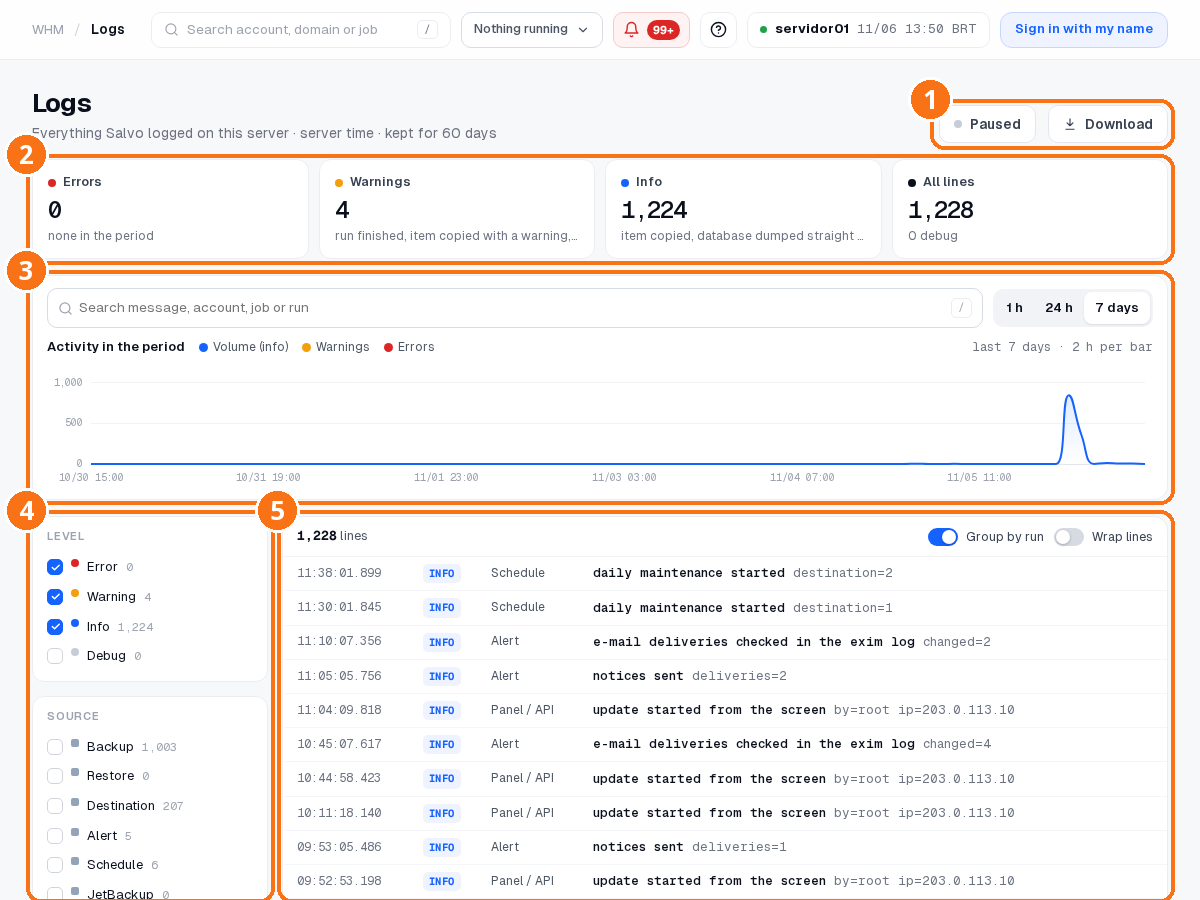
- Live / Paused and Download.
- The four numbers, per level.
- The search, the period and the activity chart.
- The filters.
- The lines.
At the top:
- Live reloads every 5 seconds; click it for Paused.
- Download saves the lines of the current filters to a
.txt(salvo-logs-YYYYMMDD-HHMM.txt), with no line limit. - The subtitle says for how many days logs are kept (default 30; see Settings).
The four numbers (Errors, Warnings, Info and All lines) count the whole period, per level, and show the last error or the most frequent messages. Clicking one filters by that level.
Activity in the period: the search (Search message, account, job or run; / jumps to it), the period (1 h,
24 h, the default, or 7 days) and the volume chart with warnings and errors marked.
On the left, the filters, each with its count:
| Filter | |
|---|---|
| Level | Error, Warning, Info and Debug. At first, all but Debug |
| Source | Backup, Restore, Destination, Alert, Schedule, JetBackup, Panel / API, Migration, Database servers, Mail center |
| Job and Account | the 8 most frequent; with more, the search and See all show up |
The lines, newest first:
- Group by run (on) gathers the lines of the same run or restore in a block (Run 60 · Accounts), with the start, the end and the colour of the block's worst level. Wrap lines shows the whole message.
- Each line: time, level, source, the message and up to 4 fields. Clicking it opens the details: when, level, source, the links to the run or restore, the job and the account, every field and the line's JSON, with Show around (the other lines of the same run), Copy line and Open account.
- The screen shows 200 lines at a time; Load older brings 200 more.
- With no result, Clear filters starts over (keeping the period).
A run's drawer, in Runs, has a link that opens Logs already filtered by it.
Where they live
In /var/lib/salvo/logs/ (the state folder), one file per run (execucao-<id>.jsonl), per restore (restore-<id>.jsonl)
and per migration (migration-<id>.jsonl), and one for the server per day (servidor-YYYY-MM-DD.jsonl). Those older
than the term are deleted at the start of each backup.
On the command line
# the same lines as the screen (default: 24 h, levels erro, aviso and info)
salvo logs --since 24h --level erro,aviso --source backup --job Accounts --account account01 --search "timeout"
salvo logs --since 7d --limit 100 --json
# how many days to keep and the server's level
salvo config --log-retention-days 30 --log-level info
# the level of one job only, or of one run only
salvo job-log --job ID --level depuracao      # --default follows the server again
salvo run --job ID --log-level depuracao
To log everything for a while and build a bundle for support, see Diagnostics.
Next: Audit.