Audit
Who did what in Salvo, when and from where. Everything that changes something is recorded: actions on the screen, commands in the terminal, what Salvo does by itself and what arrives from another server over the migration channel. When a value changes, the record keeps the before and after. Secrets never go into the record.
● available cPanel and DirectAdmin.
The ? icon on the screen's top bar opens this page.
On the screen
Audit, in the menu.
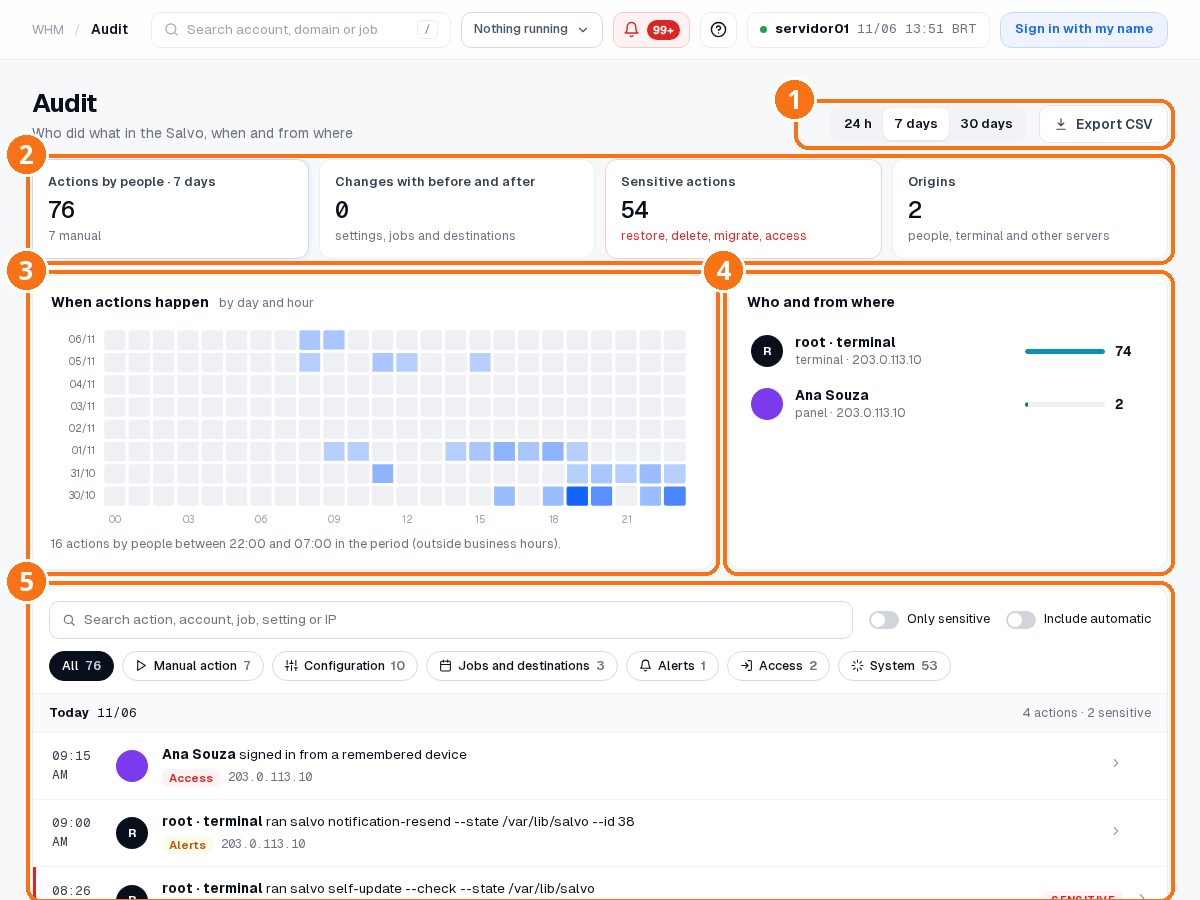
- The period and Export CSV.
- The four numbers.
- When actions happen.
- Who and from where.
- The search, the filters and the list.
At the top, the period (24 h, 7 days, the default, or 30 days) and Export CSV.
Notices that show only when needed:
- The audit was changed outside the Salvo: each record keeps the digest (hash) of the previous one; if someone changed the database directly, the chain breaks at that record, and records from it on cannot be trusted.
- Access from a new IP: an admin used Salvo from an IP not seen for them before. It was me hides the notice (in this browser); See what they did filters their actions.
The four numbers (without Salvo's automatic actions): Actions by people, Changes with before and after (settings, jobs and destinations), Sensitive actions (restore, delete, migrate, access; click to filter) and Origins (people, terminal and other servers).
A whole-account restore with From when per part says which runs each part came from, for example restored loja01 (email from run 41, databases from run 38) (0.8.27).
When actions happen: a map by day and hour, with how many actions by people happened between 22:00 and 07:00. Who and from where: the 8 most frequent who-and-IP pairs, with the new IP badge; clicking filters.
The list, by day:
- The search (Search action, account, job, setting or IP), Only sensitive and Include automatic (off: what Salvo does by itself stays out).
- The categories, with the count: Manual action, Configuration, Jobs and destinations, Restore, Migration, Alerts, Access, System and Automatic.
- Each line: time, who, the phrase of what was done, the before → after when a single field changed (or N fields changed), the category, the IP, failed when it errored and the SENSITIVE badge.
- The screen shows up to 300 records; for more, refine the filters or export the CSV.
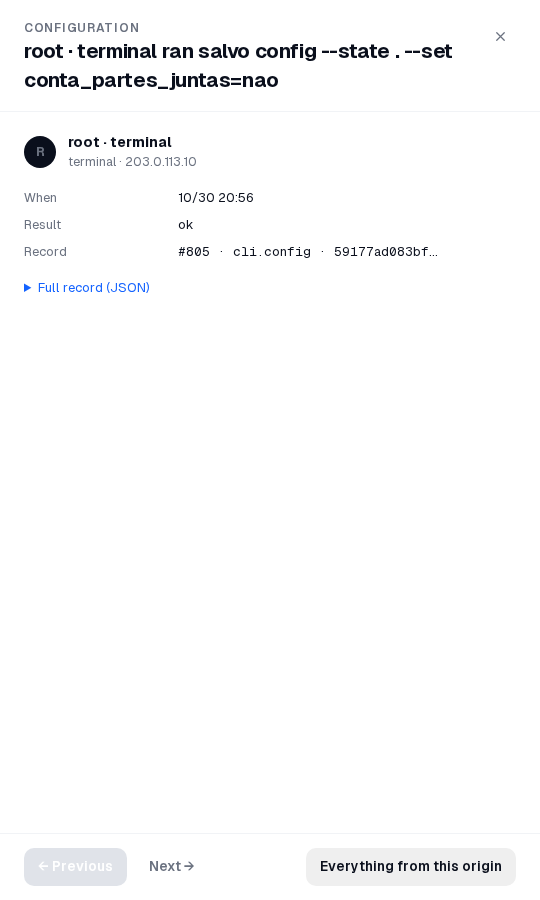
Clicking a line opens the detail: when, item, result, reason given, session and the record number; the Before and after table (field, before, after); the Full record (JSON); and Previous, Next, Everything from this origin and Everything about this item.
Export CSV takes every record of the current filters (salvo-audit-YYYYMMDD-HHMM.csv), with who, IP, category,
action, item, the phrase, the changes, the reason, whether it is sensitive and the result.
The audit only grows: no screen deletes or edits a record.
On the command line
# the same actions as the screen (default: 7 days, without automatic ones)
salvo audit --period 30d --category configuration --sensitive
salvo audit --actor admin --q "destination" --automatic --json
# checks the record chain (was the database changed outside Salvo?)
salvo audit-verify
--period takes 24h, 7d, 30d or 365d; --category, manual, configuration, jobs_destinations, restore, migration,
alerts, access, system or automatic. Commands that change something are also audited, as root · terminal.
Next: Administrators.