Restore and download
Restoring is bringing back, from a backup point, something that went missing or broke: a whole account, an account that left the server, a mailbox (or just some of its folders, messages, contacts or calendar), a database, files of the home or one configuration item. Download is the same path, but instead of writing on the server Salvo builds a file for you to hand to the customer.
Every type goes through the same assistant, in five steps: What · From when · How · Checks · Review. Nothing is written before you review, and every restore goes to the Audit log: who, when, what, from which point and how.
● available in 0.5.95 ● message search: 0.5.100 ● download mailbox, contacts and calendar: 0.5.103 ● mailbox settings and forwarders: 0.5.104 ● checks before the last click, Try again and Undo: 0.5.108–0.5.109 ● in testing: restore on the mail node, Apply to the mailbox (settings) and forwarders cPanel and DirectAdmin (see what changes on DirectAdmin at the end of the page).
On the screen
RECOVER › Restore & download opens the panel:
- Download a file and New restore (0.7.25).
- Four numbers: the restores in 30 days (done and canceled), the downloads in 30 days (how many are ready to download), the estimated × actual (the average error of the estimates of the restores measured here) and what is running now.
- What do you want to recover?: the six types, each with Restore and the download button with the format (cpmove, .mbox, .sql.gz, .tar.gz; Configuration cannot be downloaded). A click opens the assistant on that type.
- History: each restore (R-…) and each download (D-…), with type, item, status, when and the time or the file. All, Restores and Downloads filter. A click opens its page.
The assistant also opens with something already chosen, on the first step still missing:
- from the Mail center: Restore on the mailbox;
- from Accounts: Restore on the account's line, and Restore account on the Removed tab (the Deleted account type);
- from an account's backups: Restore on a mailbox, a database or a configuration item, and Restore this folder / Restore selected in the files, with the item and the point already chosen (0.5.109).
Nothing runs in one click: you still go through How, Checks and Review.
More than one account at once goes through the queue, from the same panel: Several accounts and cPanel packages (cpmove) (cPanel only), under More than one account at once, through the queue (0.5.109).
The six types
| Type | What comes back | How |
|---|---|---|
| Whole account | files, mail, databases and configuration of an account | Merge with the current one (recommended), Replace the current one (a backup of the current one first), New account (beside it, with another username) |
| Deleted account | an account that no longer exists on the server | New account: recreates the account; if the username is taken, you choose another. See Removed accounts |
| Mailbox | the whole mailbox, folders, messages, contacts, calendar or settings | see Mailbox |
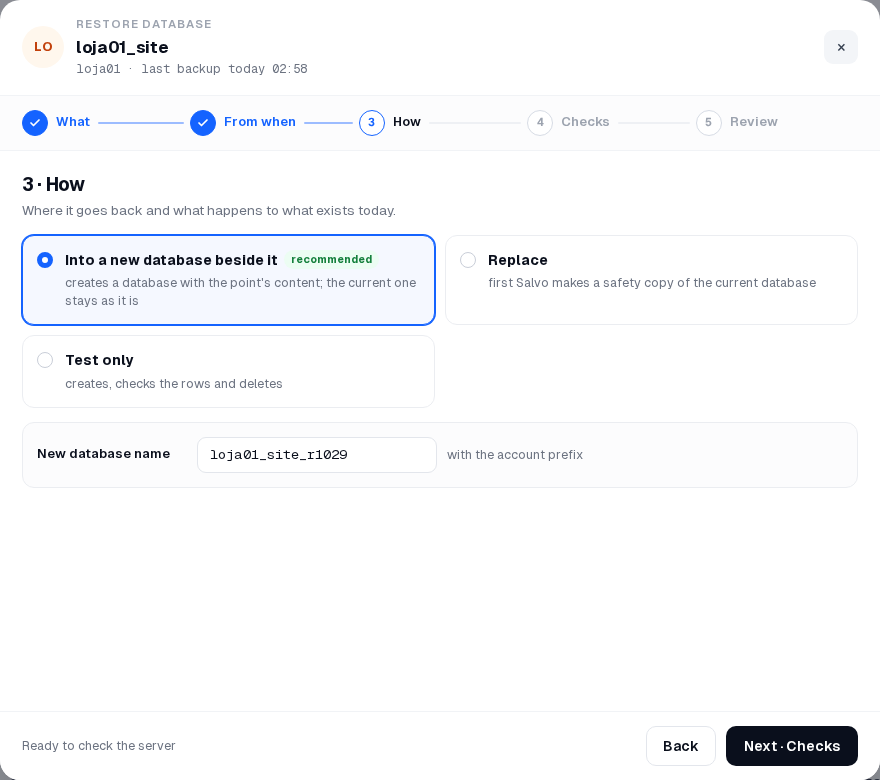
| Database | the whole database or some tables | Into a new database beside it (recommended), Replace (a safety copy first), Test only (creates, checks the rows and deletes). See Restore a database |
| Files | folders and files of the home | Merge (recommended: only what is missing), Overwrite (today's are kept first), Into a separate folder (inside the home, to compare) |
| Configuration | DNS, SSL, cron, FTP, database users and forwarders | Only what was missing (recommended), Replace with the backup (the current one is kept) |
The five steps
- What: search the account, domain, mailbox or database and check what comes back. Each item shows the point against today (folders, address books, calendars, tables, home paths, configuration items, account parts).
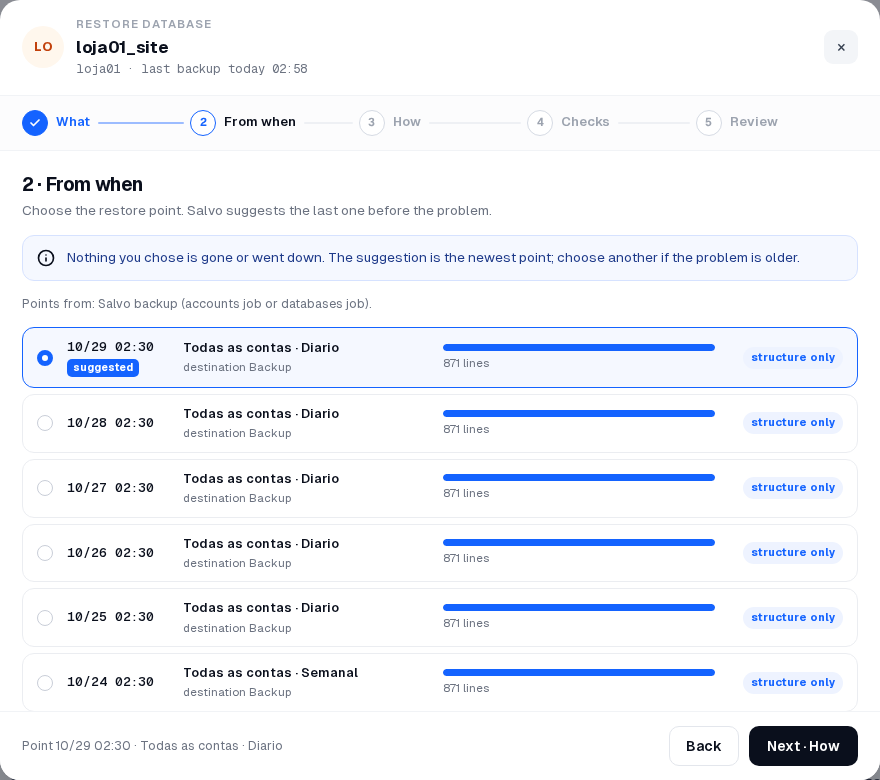
- From when: every point, each with what it had of your choice (read from the backup, never deduced) and its Integrity. Salvo suggests a point: the last one before a drop, with the reason (X had N on …; the newest point has M), or the newest when nothing went down. Use the suggestion applies it. In every type, a point damaged in the Integrity check is never the suggestion while there is a good one: the suggestion moves to the closest point without damage, and says why (0.5.109). Choosing a damaged point warns that whatever is in the bad pieces does not come back.
- How: the modes of the type (table above), with the recommended one marked. What would fail later is caught
here (0.5.109): the new database name (lowercase letters, digits and
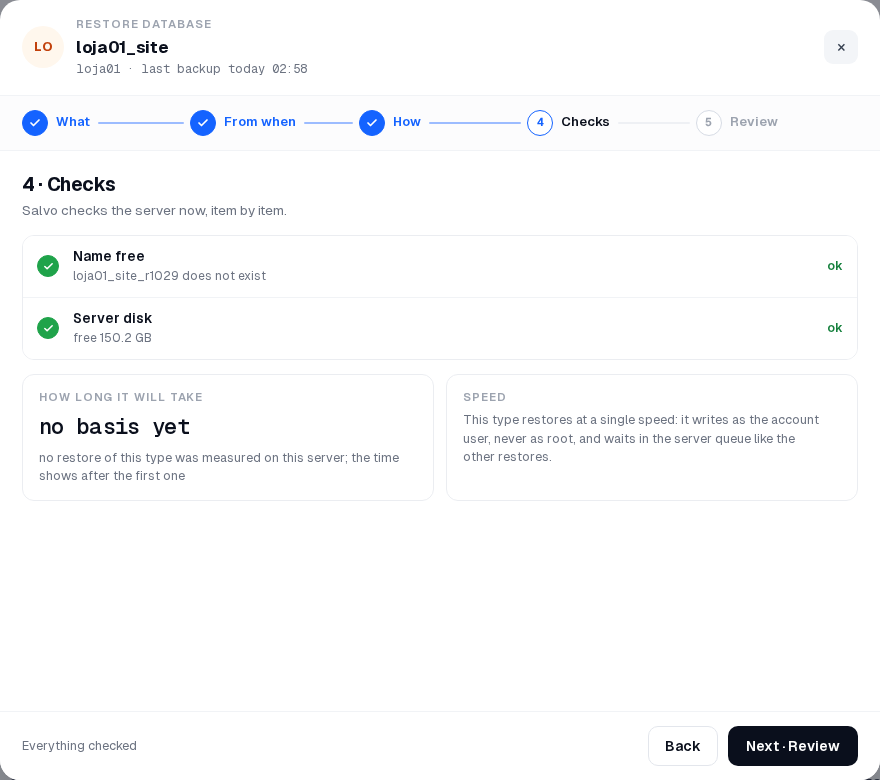
_, starting with a letter, different from the original and with the account prefix) and Test only with only some tables (it brings the whole database back). - Checks: the server is checked now, item by item (each item is really checked, on this server): ok, needs a decision or blocks. When several warnings only ask to go on anyway, Go ahead with all warnings accepts them in one click (0.5.109). The time estimate only comes from restores measured on this server; without them, no basis yet.
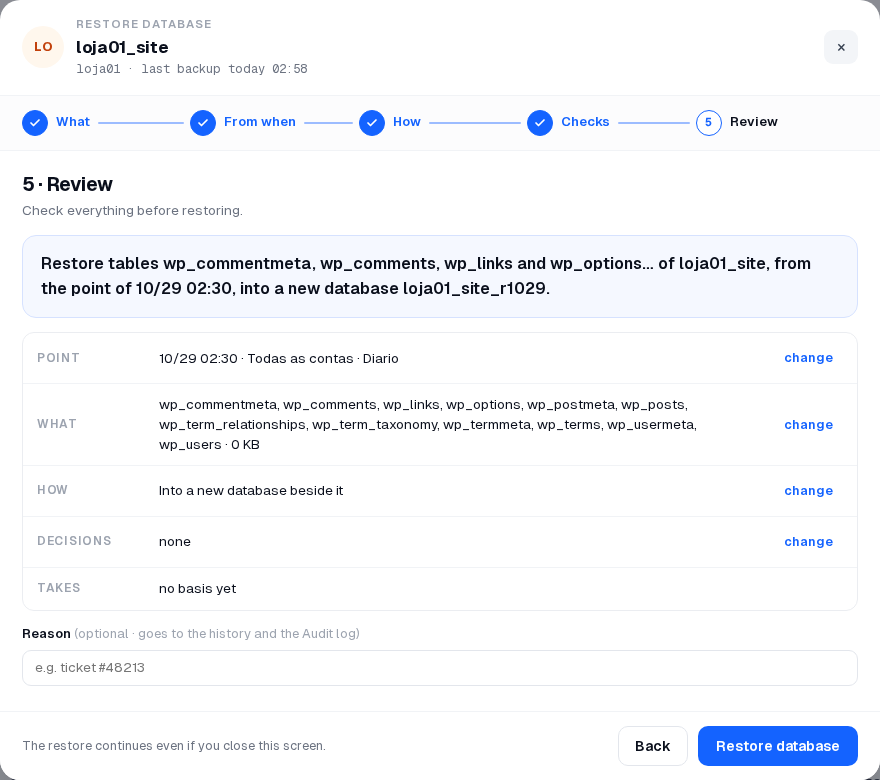
- Review: the sentence of what will happen (Restore the mailbox X, from the point of …, merging into the mailbox, no duplicates), the decisions, how long it takes and the Reason (optional, goes to the history and the Audit log).
Closing the assistant (Esc or a click outside) on step 1 closes it; from step 2 on, it asks first: Discard this restore?, with Keep going and Discard (0.5.109).
The assistant moves around the screen: drag it by the header to see what is behind it; a double click on the header brings it back to the center. On a phone it fills the screen and stays put (0.7.26). The same goes for New destination, the Maintenance detail and the migration log.
The restore goes on even if you close the screen, and shows in Runs and in the activity center.
The restore page
- Queued and running: the bytes written (the percentage counts only bytes written, never time), the steps, what is coming back now, the speed (now, average and peak), the server load, the expected × actual, by part and the live log.
- Pause and Cancel show only where they work (0.5.108). A queued restore can always be cancelled: it leaves the queue and nothing changes. Once it has started, only a whole account restore on cPanel pauses (never while the panel is creating the account, nor in the last step), and only a restore that creates a new account stops halfway: Cancel then asks on the page itself, because it removes the account being created (Remove the account and cancel; nothing in the backup is deleted). Any other running restore goes to the end, and the page says so.
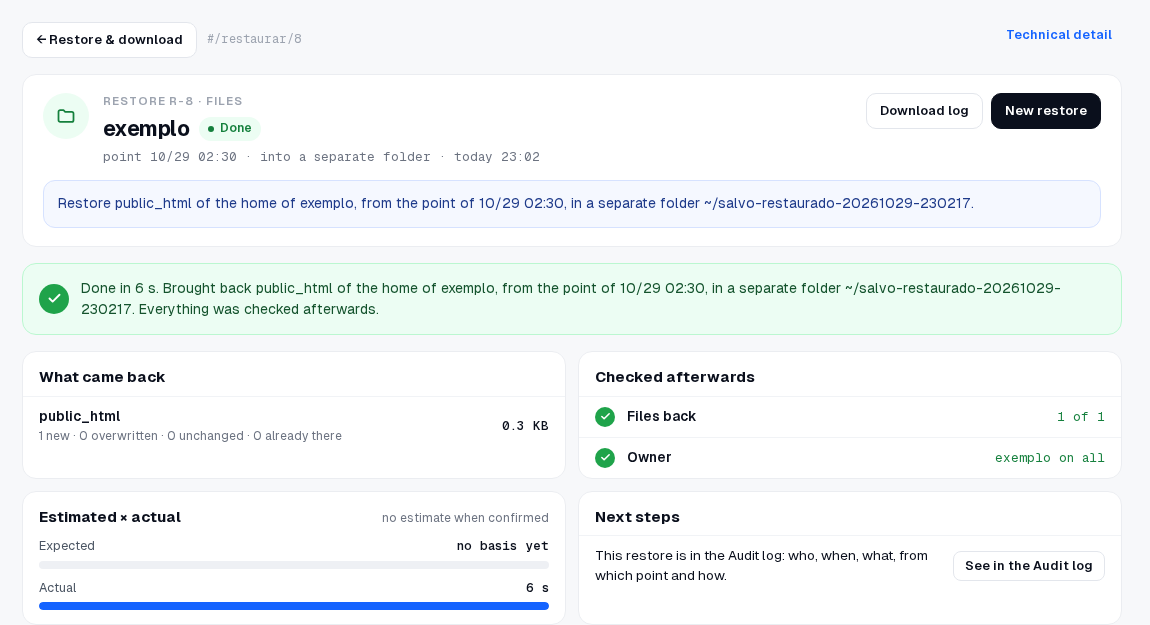
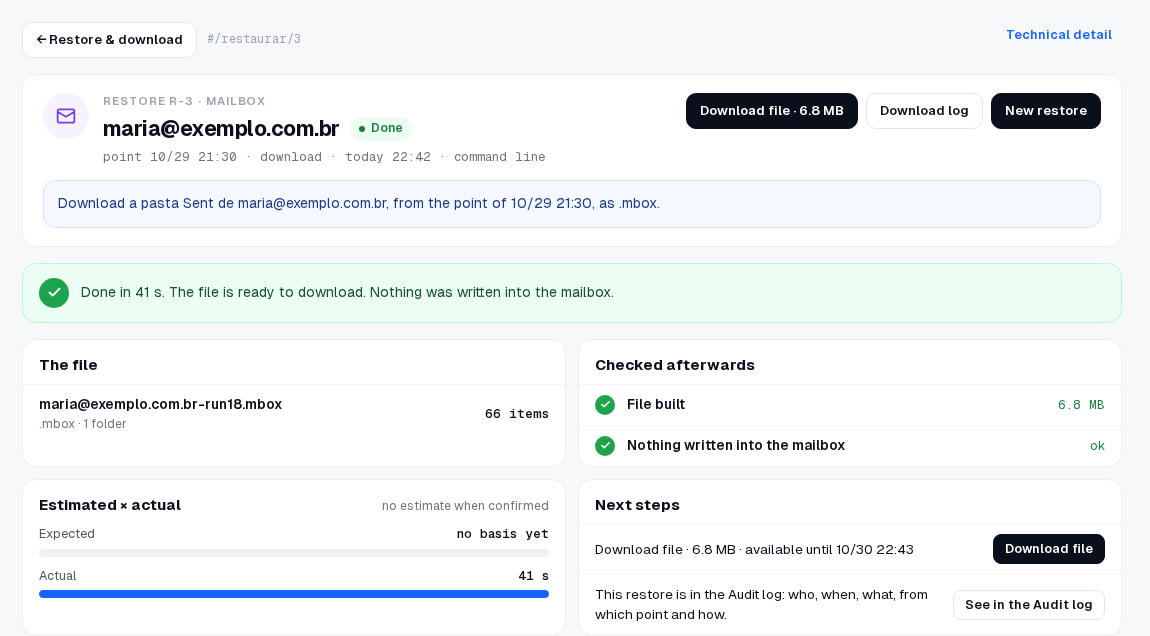
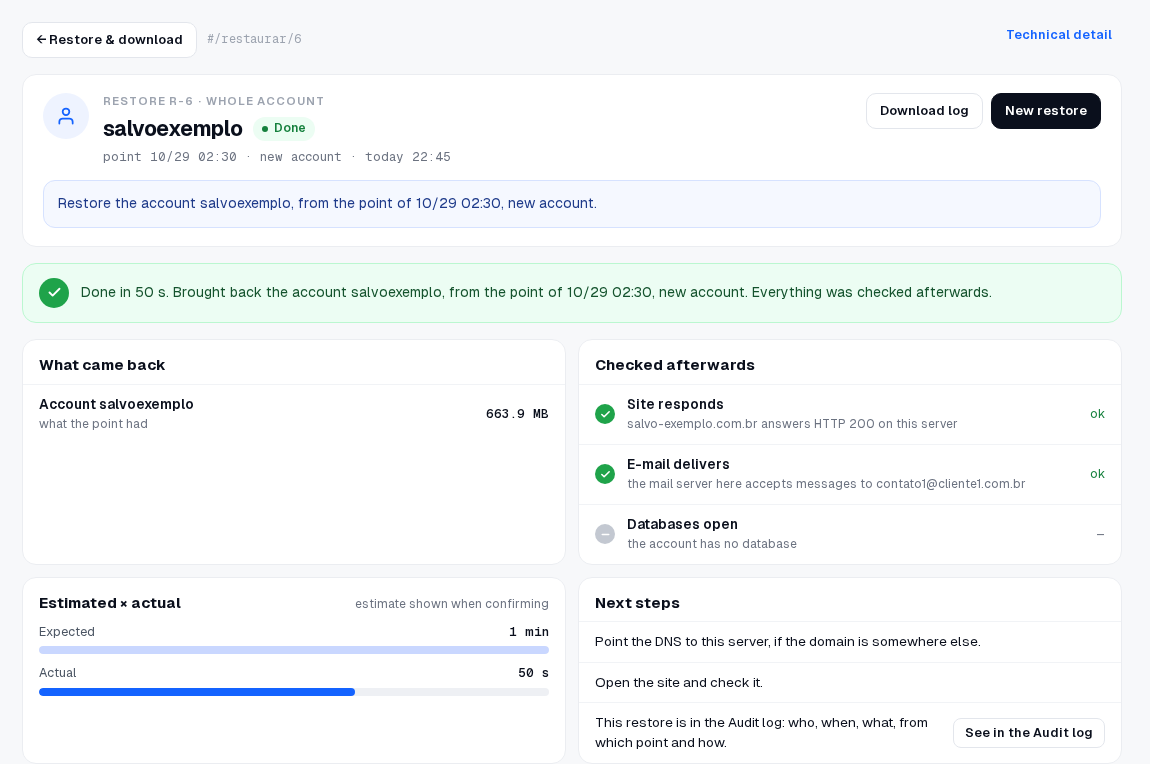
- Done: What came back, Checked afterwards (site responds, mail delivers, databases open, rows per table, owner of the files), the expected × actual and the Next steps. For a new mailbox, the password shows only once, with Copy and I saved it, hide. The end notification brings the result, the time, the point and the numbers of each type (0.7.30).
- Failed: the verdict and, in Next steps, Try again (the assistant with the same item, already at that point) and Choose another point (the same item, to pick another point) (0.5.108).
- Undo (after Replace the current one, on cPanel): before replacing, Salvo kept the account as it was. Undo Replace asks on the page and Go back to the copy puts the account back to that copy, as a new restore (what changed in the account since then is lost; first, Salvo keeps a copy of the account as it is now) (0.5.108).
Download a file
● available in 0.7.25 every type except Configuration
Download is the same assistant, but instead of writing on the server Salvo builds a file from the backup point for you to download to your computer. Nothing is written into the account: Salvo only reads the point.
It starts from Download a file (at the top of the panel), from each type's download button, from Accounts › the account › Points › Download or from the download buttons of an account's backups, which open the assistant already on Download. In the How step, choose Download a file and the format:
| Type | Formats |
|---|---|
| Files | .tar.gz or .zip (with no folder chosen, the whole home) |
| Database | .sql.gz (recommended; phpMyAdmin and mysql import it directly) or .sql (plain text), the whole database or only some tables |
| Whole account and deleted account | the panel's package: cpmove on cPanel, the DirectAdmin backup on DirectAdmin |
| Mailbox | .mbox, .eml or maildir (messages), .vcf (contacts), .ics (calendar); see Download |
The step shows each format's expected size, You will download (the file name and size) and the Server disk: how much building the file uses and how much stays free; the space comes back when the file expires.
Checks really opens the point on the destination where it was written (even if the destination moved to another folder later, 0.7.27): if the files are no longer there (deleted by hand on the storage, for instance), it says so right here, before the queue, and not halfway through the download. It also checks that nothing will be written, the space, the panel's format and who downloads; Review shows the sentence of what will come out. Build the file runs in the background: you can close the screen, the progress stays in Runs.
The download page (D-…):
- Building, with the progress; then Ready to download: the name, the size, until when it is available, Download file, the sha256 and how many times it was downloaded, Checked before release (the file opens, matches the point, nothing changed on the server) and How to use the file (the command to import or restore).
- Delete the file now removes the file from the server before the deadline (on the command line, since 0.7.40,
salvo restore-expire --delete-download ID). - Expired: the file stays 24 hours after it is ready and is deleted by itself; the point is still kept, and Build again builds it once more.
The cores, the compression and the reads used to build the whole account are set in Settings › Restore.
The file lives in /var/lib/salvo/downloads/<id>/, readable only by root, and each download goes to the
Audit.
Mailbox
A deleted mailbox comes back with the right password and quota also from a mail-only point (0.7.140, cPanel and DirectAdmin).
In What, choose what comes back from the mailbox:
| Bring back | Detail |
|---|---|
| Whole mailbox and Folders | the chosen folders come back with their subfolders |
| Messages | search by sender, recipient, subject, period, size, attachment and no longer exist today (see below) |
| Contacts and Calendar | the chosen address books and calendars |
| Configuration | filters, forwarders, autoresponder, quota, password and webmail preferences, each item with the point × today |
The points come from the account backup and, when the mailbox has them, from the mail job copies (every 30 minutes).
The modes, for messages and folders:
- Merge into the mailbox (recommended): messages go back to the same folders; the ones that already exist are skipped, no duplicates.
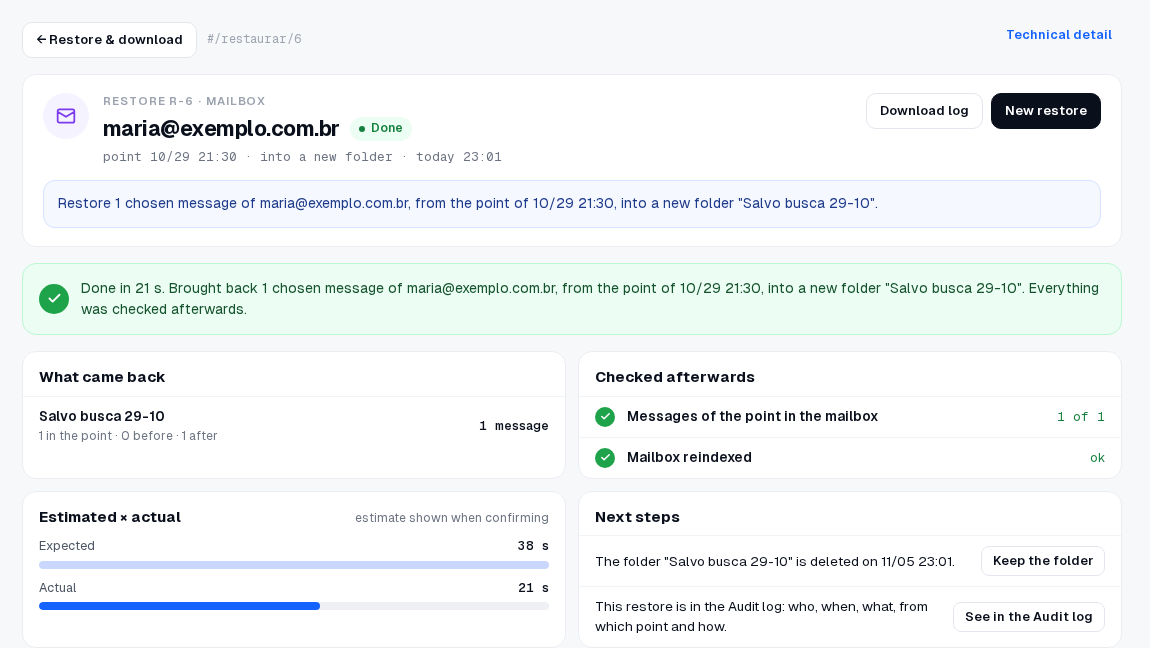
- Into a new folder: the folder structure comes inside a folder with the name you give; Delete the folder after deletes it on its own after N days.
- Into another mailbox of the account: for example, the employee left and the management needs the history.
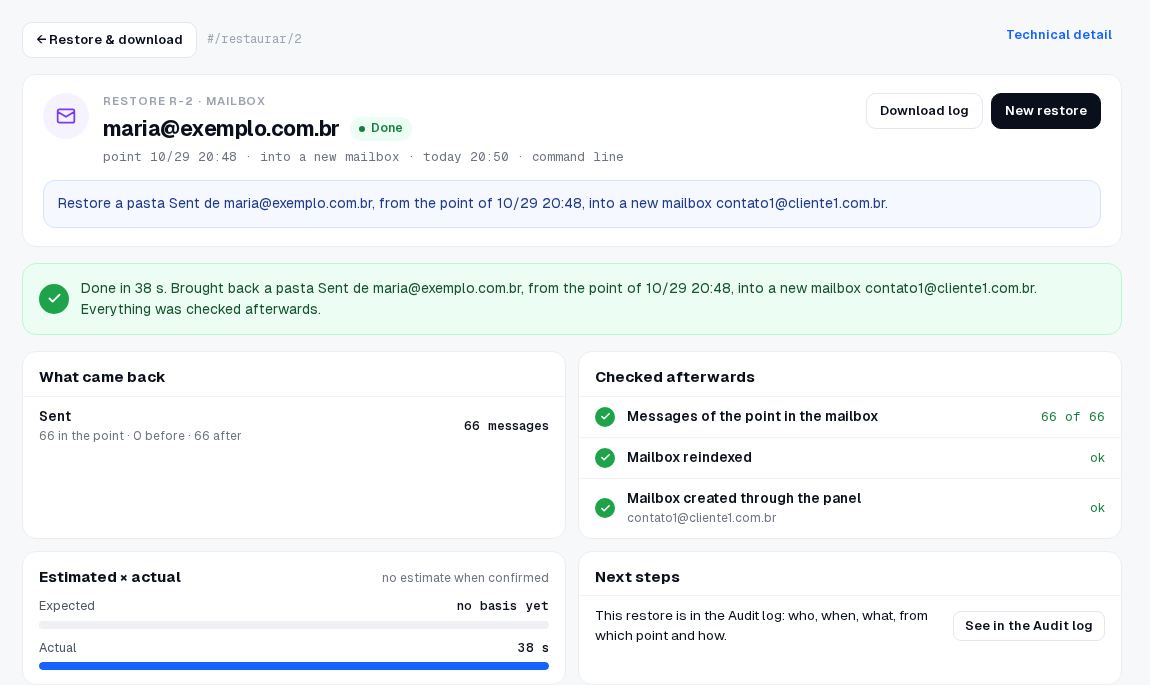
- Into a new mailbox: Salvo creates the mailbox through the panel and restores into it; the password is generated by Salvo (or typed, at least 12 characters) and never goes to the log or the Audit log.
- Download: see Download.
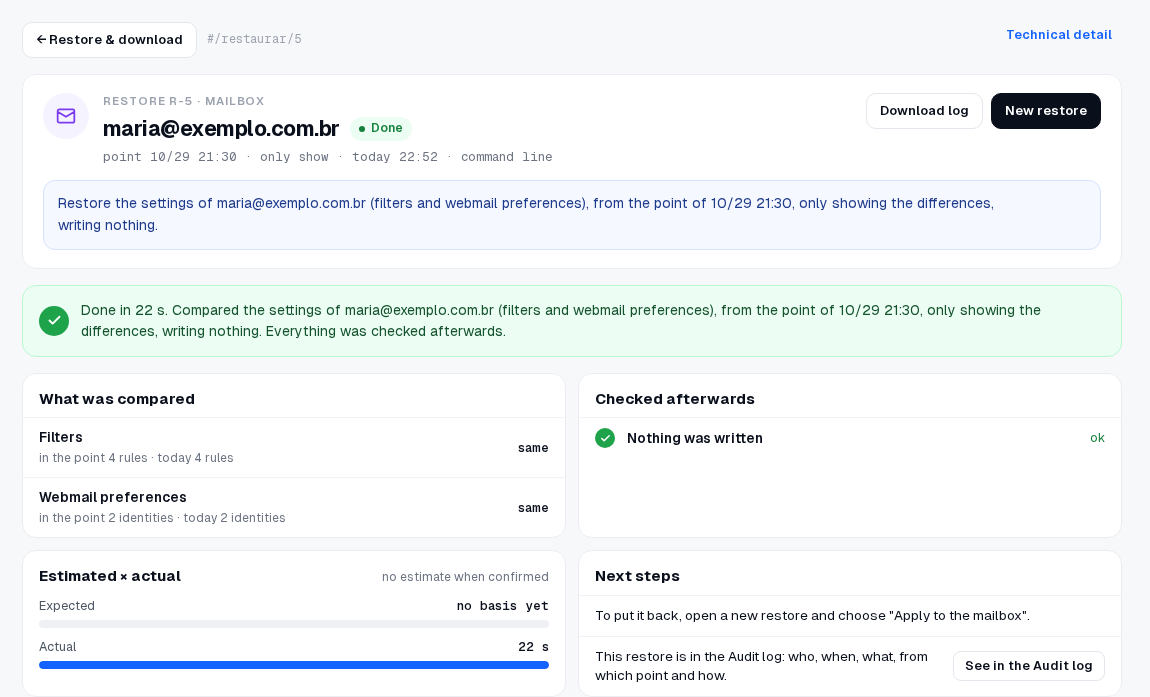
Contacts and calendar: Only the missing ones (recommended) or Replace with the point's. Settings: Apply to the mailbox (the chosen items go back as in the point, and what changes is kept first) or Only show (compares and writes nothing).
In the settings, the password item puts back the password the mailbox had in the point: phones, computers and mail apps must use the old password. The screen shows only the day each password was set, never the password.
Search messages
The mail server's index only knows what exists today, and whoever restores is looking for what was deleted. So Salvo builds a search index of the mailbox with the header of every message of every point (each message is read once, even if it is in several points).
- In What › Messages, Build the index first shows the time estimate and where it comes from (the indexes already built here, this server's mailbox restores or our lab).
- The index is built in the background: you can close the assistant.
- Search by From, To, Subject contains, Received (period), Size, with attachment and no longer exist today. Each message shows its folder and the points that have it. Check the ones that come back.
- In From when, Salvo counts the checked messages in each point and suggests the last point that has them all.
The index stays on this server (never on the destination), only the admin restoring sees it, every search goes to the Audit log, and it goes away by itself after 7 days unused. In the lab, a 21 thousand-message mailbox in 3 points had its index built in 1 min 11 s, and the search answers in a little over 1 second.
Download
The Download mode writes nothing into the mailbox: Salvo builds a file with what you chose.
| Format | What comes |
|---|---|
| .mbox | one per folder; more than one folder comes in a .zip. Opens in Thunderbird and Apple Mail |
| .eml | one per message, in its original folders, in a .zip. Opens in any mail program |
| maildir | the folders with their original names and read marks, in a .zip |
| .vcf | the contacts of the chosen address books, in one file |
| .ics | the events and tasks of the chosen calendars, in one calendar |
The file stays on this server for 24 hours (only root can read it) and is then deleted; the restore page shows Download file with the deadline. To download again after that, start another restore in the Download mode.
A mailbox on a mail node
If the mailbox lives on a mail node, it goes back on the node, written as the account user through the node's WHM: only the messages missing there, then the quota, the index and a check (before + sent = after). It needs Authorize writing for that node, asked in Checks the first time (it goes to the Audit log and can be revoked).
- Works: Merge into the mailbox, Into a new folder and Download (download only reads the point and does not touch the node).
- Not yet: into another mailbox, into a new mailbox, contacts, calendar and settings on the node.
A whole account
For Whole account and Deleted account, How › After has two switches:
- Check the site and e-mail afterwards: Salvo checks it when the whole account comes back (Replace the current one or New account), on cPanel and on DirectAdmin (0.6.0). With Merge with the current one the switch stays off and says why, instead of failing on the last click (0.5.108).
- Keep suspended until I release it: the account comes back suspended; unsuspend it in the panel when you want (0.5.109).
In Checks, Speed has the three profiles and Advanced ▾, the same as for the deleted account (see Removed accounts).
One part from each point
● preview in 0.7.137 cPanel and DirectAdmin.
When restoring a whole account, the From when step has three modes:
| Mode | What comes back |
|---|---|
| Latest of each part | each part comes from its latest point |
| All from the same moment | only the points where files and database were copied together: the website comes back consistent |
| Pick the point of each part | one point per part: mail from one time, the database from another. Each part has the list of times (beside the strip; on the phone, below it, 0.8.30), and the strip of the last 48 hours shows them all at once |
If files and database come from different times, the screen warns that the website may not open with that combination (it does not block); mail and configuration can come from another time with no problem. A chosen point that does not work for that part refuses the restore, instead of quietly bringing something else.
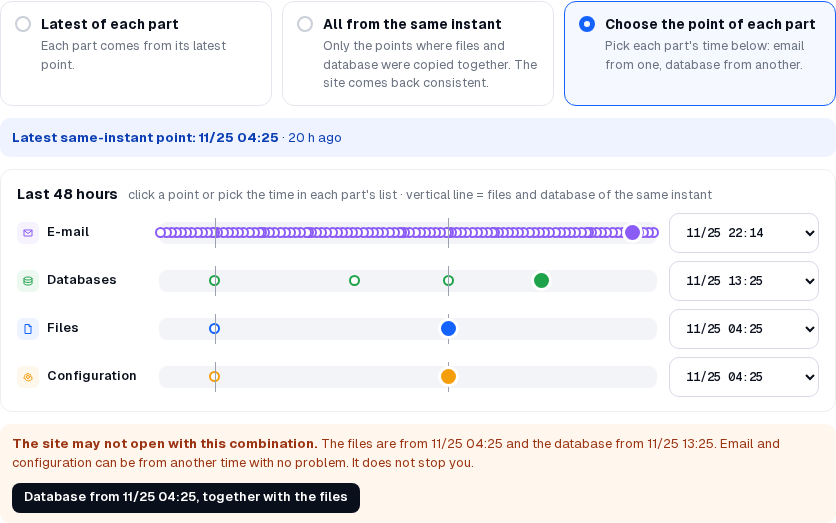
In All from the same moment, the screen shows the chosen point's date and age, highlighted when it is older than 24 hours (what changed after it does not come back), and each part's strip from that point on (0.7.140).
salvo restore-account --account shop --job 3 --parts-at mail=<run>,db=<run>,files=<run>,conf=<run>
An account with another domain
In Whole account (as a new account) and Deleted account, How › Restore domain restores the account with
another domain, to validate or test without touching the real site: your own, or the temporary salvo-<domain>.
Every domain of the account is swapped in the configuration (addon and parked ones become salvo-<domain>);
certificates and the DNS zone stay out. The site does not change inside: a WordPress keeps the old address in its
database. On DirectAdmin too (0.6.0).
On the command line
# mailbox: merge, into a new folder (gone in 7 days), into another mailbox or into a new mailbox
salvo restore-mailbox --job ID --account account01 --address contact@domain.com --mode merge
salvo restore-mailbox --job ID --account account01 --address contact@domain.com --mode folder --folder Restored --expire-days 7
salvo restore-mailbox --job ID --account account01 --address contact@domain.com --mode new_box --target-box history@domain.com
# only some folders (repeat --folder-name), or contacts and calendar
salvo restore-mailbox ... --what folders --folder-name INBOX --folder-name Sent --mode merge
salvo restore-mailbox ... --what contacts --mode missing
# mailbox settings: only show, or apply some items
salvo restore-mailbox ... --what settings --mode show
salvo restore-mailbox ... --what settings --setting filters --setting forwarders --mode apply
# download: mbox, eml or maildir (messages), vcf (contacts), ics (calendar)
salvo restore-mailbox ... --mode download --format mbox
# download files, a database or the whole account (kept 24 h; --to copies the file)
salvo restore-download --kind files --job ID --account account01 --path public_html --format zip --to /root
salvo restore-download --kind database --job ID --account account01 --database account01_site --table wp_posts --format sqlgz
salvo restore-download --kind account --job ID --account account01 --to /root

# a mailbox's search index, the search and restoring what was found
salvo mail-index --address contact@domain.com [--status | --delete]
salvo mail-search --address contact@domain.com --from customer --since 2026-10-01 --gone --json
salvo restore-mailbox ... --what messages --message KEY --message KEY --mode merge

# files of the home: merge, overwrite or into a separate folder
salvo restore-files --job ID --account account01 --path public_html/wp-content --mode folder
# one configuration item (the forwarders: email_fwd)
salvo restore-config --job ID --account account01 --item dns --name domain.com
salvo restore-config --job ID --account account01 --item email_fwd
# an account with another domain, or with the temporary salvo-<domain>
salvo restore-account --job ID --account account01 --user account01b --mode new --temp-domain

# several accounts, or cPanel packages from the packages folder, through the queue
salvo restore-accounts --job ID --account account01,account02 --mode new
salvo restore-accounts --all-packages --mode new
# take a restore out of the queue (or stop a running deleted-account restore, which removes the new account)
salvo restore-cancel --id N

# restored folders waiting to go away; keep one; delete the expired ones now
salvo restore-expire [--keep N] [--run]
In restore-mailbox, ... repeats --job ID --account account01 --address contact@domain.com. --execution N picks
the point (default: the newest). KEY comes from the output of mail-search --json.
On DirectAdmin
Since 0.6.0 restoring on DirectAdmin does the same as on cPanel: whole account (new, over the current one, deleted, with another name or another domain), parts, skipping a domain, IP, the check at the end, pause, cancel and undo; mailbox, mailbox settings, database, files and each account configuration item. The differences (the DNS zone always comes back, databases and users together, configuration items always in merge) and what does not come back yet (webmail preferences, contacts and calendar) are in Salvo on DirectAdmin.
Since 0.8.26, as on cPanel, a restore over an existing account that fails puts the account back as it was, from the safety copy made before (DirectAdmin's own backup). With no safety copy, the message says where to restore from; if putting it back also fails, it gives the file to restore by hand.
Trash and Spam with purge_spam_days: if DirectAdmin is set with purge_spam_days, the usage recount that
DirectAdmin runs after the restore deletes from Trash and Spam the restored messages older than N days. This is the
server's own rule, not a restore defect.
Next: Restore a database.