Restore tests
Salvo proves on its own that the backup comes back: every so often, it takes a restore point on the destination, reads the whole point and, in the full test, loads the databases into a temporary database, checks them table by table and deletes them. Each test leaves a result with its steps and a PDF certificate.
The test does not create the account in the panel: it reads the whole point, loads each database into a temporary one and checks it table by table, counts the messages and reads the configuration.
● in testing ● available in 0.4.250 cPanel and DirectAdmin.
Salvo creates a default rule on its own: weekly, Sunday at 10:00, 1 account (the one longest without a test,
skipping suspended ones), up to 10 GB, full test. On a new installation it is created on. On a server that
already had jobs when it updated to 0.4.250, it is created off, because the full test loads temporary databases
into the server's MySQL: turn it on in Restore tests › Turn the default rule on (or restore-test-rule --id N --on).
On the screen
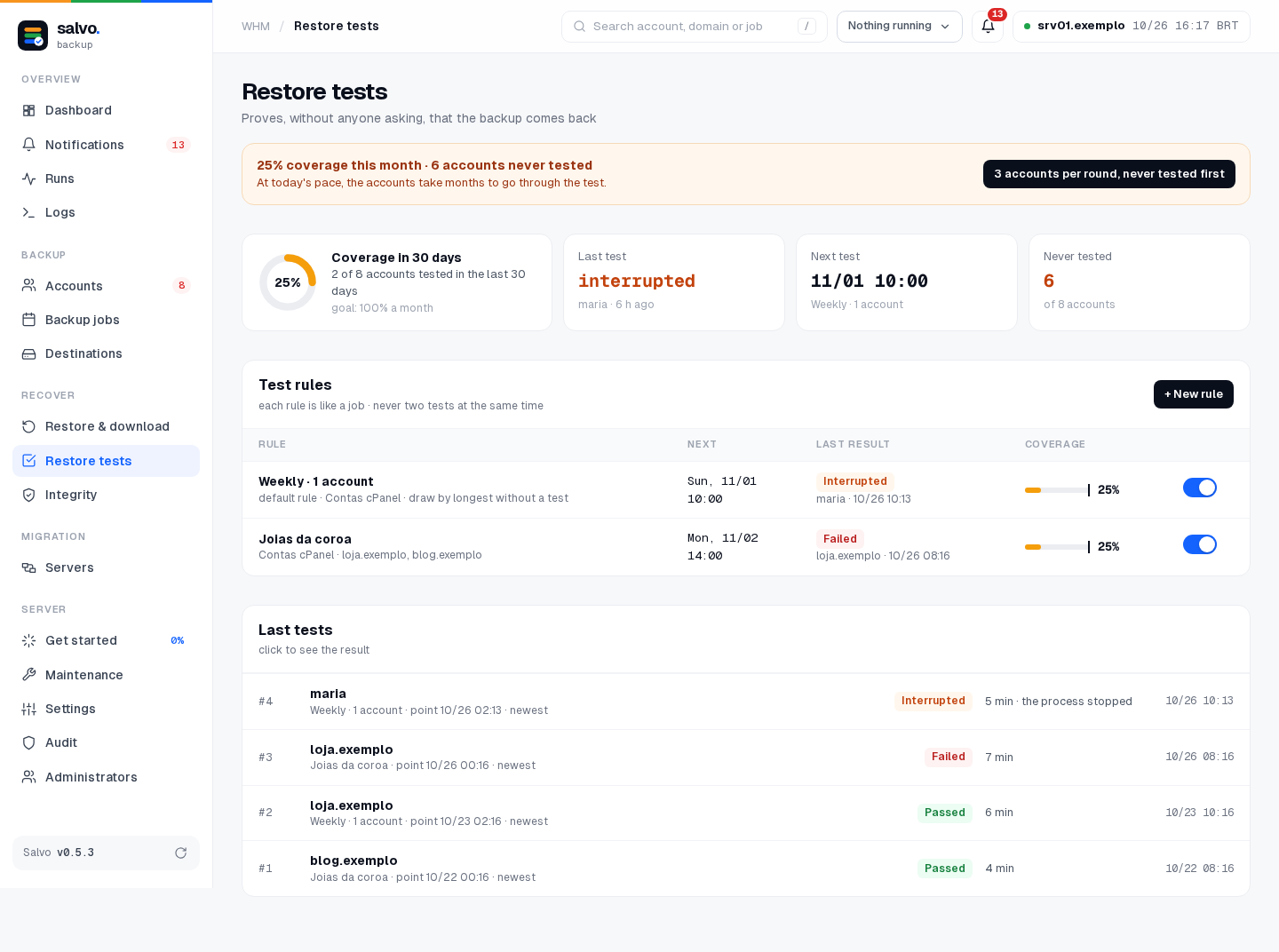
Recover › Restore tests shows the coverage in 30 days (how many accounts were tested, against the goal: 100% a month by default), the last and the next test, the accounts never tested, the rules (each with its coverage bar and on/off switch) and the Last tests. When coverage is low, a banner offers to open the rule with 3 accounts per round and the never-tested ones first.
The rule
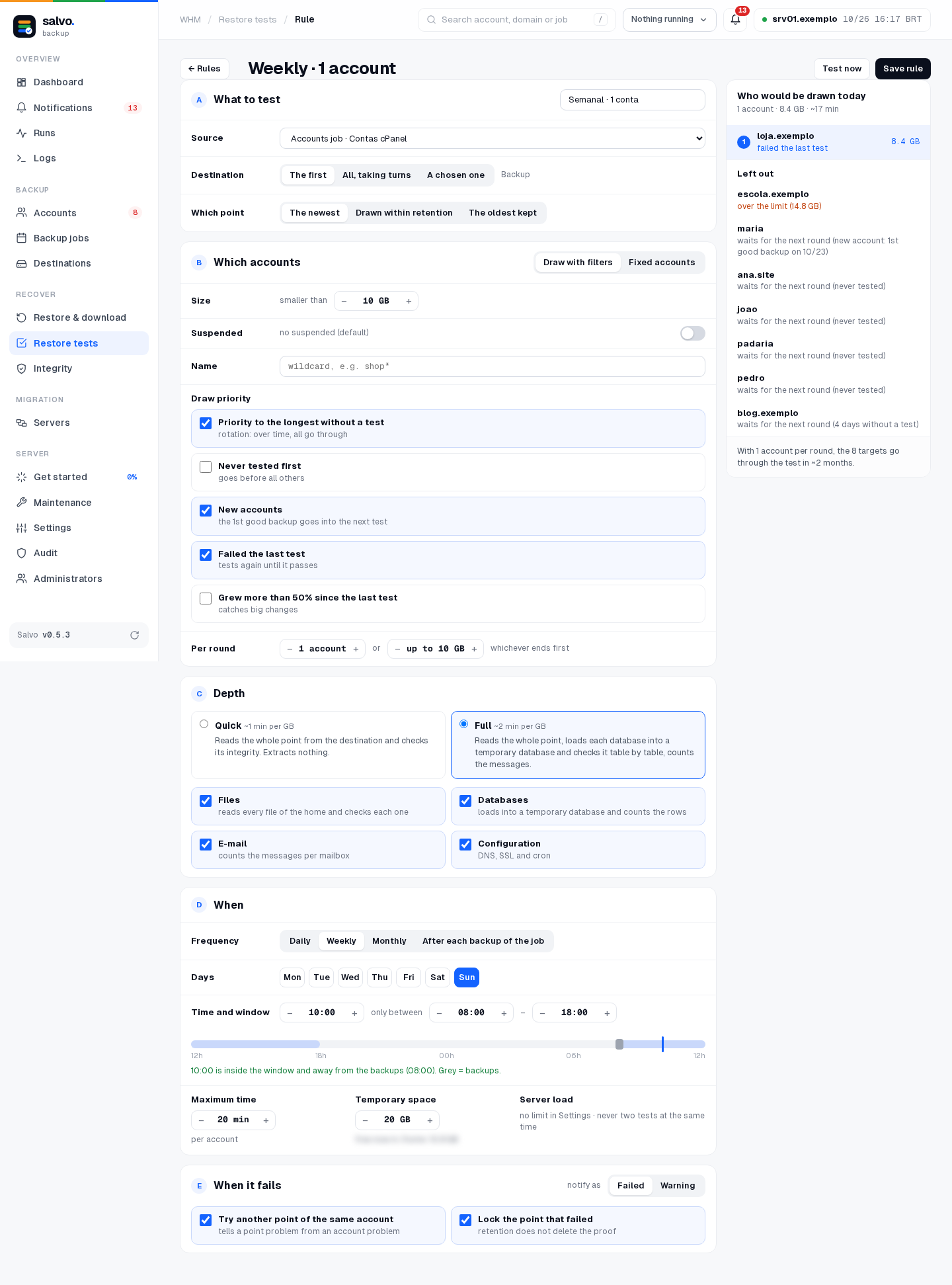
Each rule works like a job. New rule opens the editor, in five parts:
| Part | What you choose |
|---|---|
| A · What to test | the source job (accounts, databases or Salvo's configuration), the destination and which point: The newest, Drawn within retention or The oldest kept |
| B · Which accounts | Fixed accounts or Draw with filters (plan, size, suspended, name with wildcard), with the priority: longest without a test, never tested, new accounts, failed the last test, grew more than 50%; per round, N accounts or up to X GB |
| C · Depth | Quick: reads the whole point from the destination, and Salvo's engine checks each piece as it reads. Full: also loads each database into a temporary database, checks the rows table by table against the backup and deletes it; counts the messages of each mailbox |
| D · When | daily, weekly, monthly or after each backup of the job; time and window (outside the backups); maximum time per account; temporary space (only the databases take space); the load limit from Settings |
| E · When it fails | notify as Failed or Warning; try the previous point (tells a problem of the point from a problem of the account); Lock the point that failed (retention does not delete the proof; it unlocks by itself when the same point passes an equal or more complete test, 0.7.46) |
Who would be drawn today shows the accounts of the next round, with the reason for the ones left out. Two tests never run at the same time, and no test runs while a backup is running.
The result
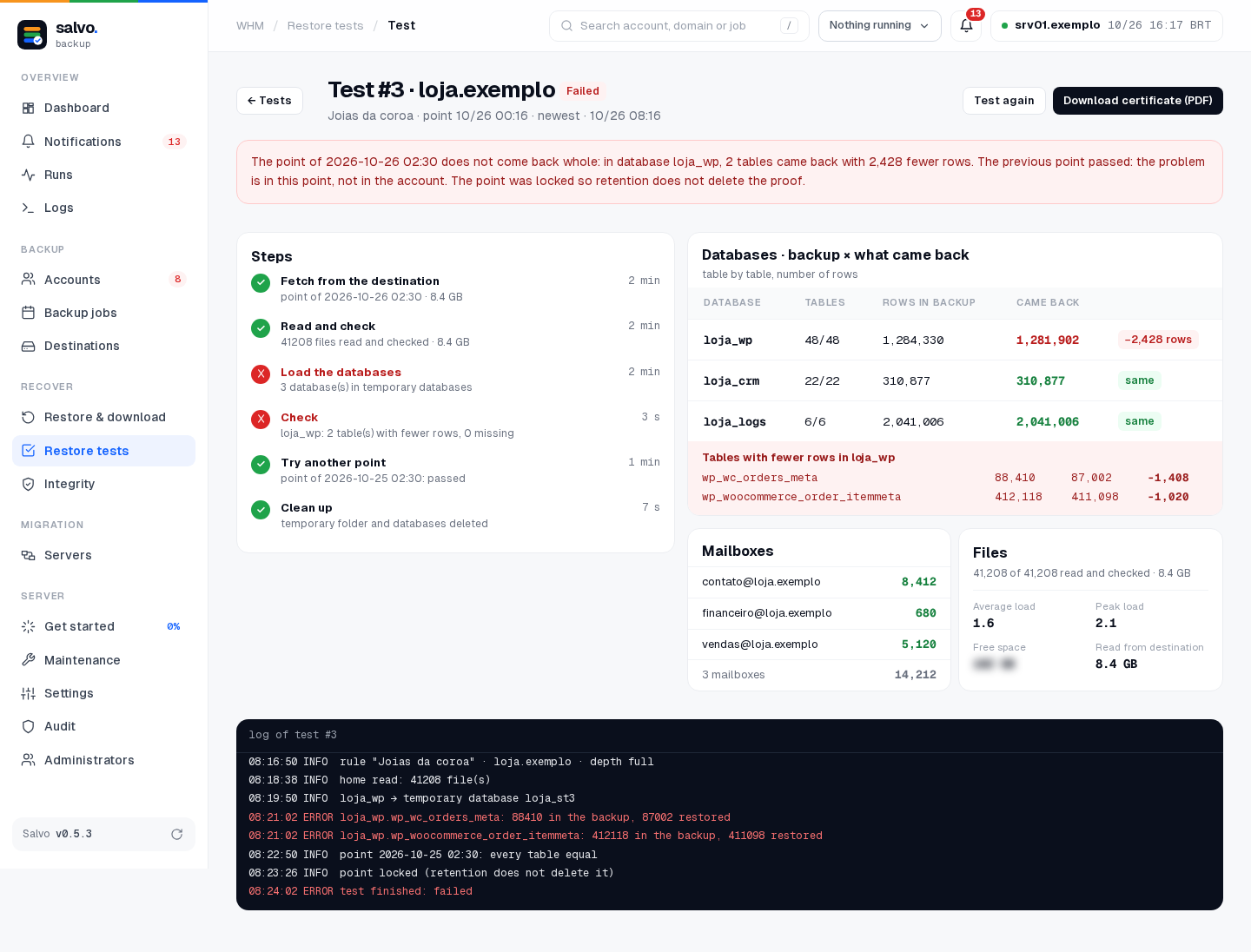
Clicking a test opens its result: the verdict; the steps (Fetch from the destination, Read and check, Load the databases, Check, Try another point, Clean up), live while it runs; each database, the backup against what came back, with the tables that differ; the mailboxes; the files; the server's load and space during the test; the log; and Download certificate (PDF), with the server, the account, the rule, the point, the depth, the steps, the databases and the SHA-256 hash of the report.
When the point a test locked passes an equal or more complete test, the result says The point that test #N had locked as proof was unlocked. A lock set by hand never leaves by itself (0.7.46).
On other screens
- Dashboard: the Backup proof card (since 0.5.0; before, Restore test), with the last test next to integrity.
- Account page: the Restore test block, with the last test, the history and Test now.
- Activity center: a test running shows there as Restore test, with the step it is on (Fetch from the destination, Read and check, Load the databases…); a click opens the result (0.5.109).
- Get started: Test a restore after the backup tests 1 account right after the first good backup.
- Notifications: test passed, test failed (stays open on the account until a test passes), account never tested for 90 days and coverage below the goal (the last two only with a rule on for more than 30 days).
The databases loaded by a test do not go into the Restore history and do not become a restore notice.
On the command line
# coverage, rules and last tests (or the API JSON with --json)
salvo restore-tests [--json]
# the result of a test
salvo restore-test-show --id N [--json]
# the PDF certificate
salvo restore-test-certificate --id N --out /root/test-N.pdf --lang en

# a rule as JSON; turn on, off, delete; who would be drawn today
salvo restore-test-rule --id N
salvo restore-test-rule --id N --on        # or --off, --delete
salvo restore-test-rule --id N --preview
# create a rule (without --id) or change only the fields in the file (with --id); - = standard input
salvo restore-test-rule [--id N] --from rule.json

# test now: a rule (optionally only some accounts), or a job with the default options
salvo restore-test-run --rule N [--account loja,blog]
# test a chosen point (the run of that backup)
salvo restore-test-run --rule N --account loja --execution ID
salvo restore-test-run --job N --account loja
# the goal: % of the accounts tested a month (1–100)
salvo restore-test-goal --pct 100
To create a rule, start from the restore-test-rule --id N output of an existing one. In --account, a database is
mysql:<database> and Salvo's configuration is salvo:config. On the first backup, setup-first-backup --test-restore does the same as the Get started option.
Next: Integrity.