Integrity
A backup is only worth something if it comes back on the day you need it. The problem is that what is stored on the destination can go bad without anyone noticing: a disk with a bad sector, a file deleted by mistake on the storage, a copy that stopped halfway, a provider that lost data. In Salvo, the backup still shows as "ok", because it was made right; the damage happened later, on the destination. And you only find out when a customer asks for a restore and it fails.
Integrity is there to find this out first. Every night, without restoring anything and without touching the accounts, Salvo goes to the destination and checks that what it stored is still there and still the same as what was written. If it finds a problem, it warns you, protects the affected backups and fixes it on its own in the next backup.
● in testing ● available in 0.5.0 ● new page and new parts every night in 0.5.11 cPanel and DirectAdmin. It covers every backup on the destination, including those of the Salvo configuration job.
How it works
The backup is stored in pieces (parts). Salvo's engine does not store each backup as one whole file: it cuts the accounts' files into parts and stores each part only once. A file that did not change since yesterday is not written again, and today's backup points to the same part as yesterday's. That is what saves space, and it is also why a single damaged part can affect several backups of the same account at once.
Each stored backup of an account is a restore point (one a day, for example). Integrity checks the points of every account, in two parts:
- Structure: is the part there? Salvo reads the list of what exists on the destination and checks that every part any point uses is still there. It downloads nothing, it only reads the list, so it is fast and runs in full every night.
- Content: is the part still right? Salvo downloads the part, opens it (it is stored encrypted) and checks that
it is still exactly what was written, by comparing its "fingerprint" (the hash). Every night it reads two things:
- the new parts: everything written since the previous check. So the early-morning backup is proven the next night;
- the slice: one part of the old parts, to catch what decays at rest. Rereading everything every night would weigh on the server and the destination, so, with the default 30-day cycle, it rereads 1/30 a night and, at the end of the 30 days, it has reread 100% of what was stored at the start of the cycle. Then a new cycle starts.
Each nightly round (the whole structure, the new parts and the slice) shows on the screen as a check. There is one a night: by default, it starts right after the night's last backup, and it never runs together with a backup or a restore test.
Trusted until. For each account, Integrity shows the newest point that was read end to end (every part it uses) with no damage: that is the one you can restore from with proof. Usually it is the previous night's backup. Right after the check is turned on, the points that already existed show as structure only: they become proven when the first cycle closes, or right away with Check this account now.
Integrity does not replace the restore test. It guarantees that the parts are on the destination and intact; it does not guarantee that the account's site works once restored. That is what Restore tests do: they really restore an account in a temporary place and check it. Together, they are the three proofs of the backup:
| Proof | Question it answers | When |
|---|---|---|
| Structure | Are all the parts on the destination? | every night, in full |
| Content | Are the parts still the same as what was written? | the new ones the next night; the old ones one slice a night, 100% every cycle (30 days) |
| Restore | Does the account come back whole and working? | in the Restore tests |
The replica's secondary on S3
● available in 0.7.155When the destination is the secondary of a replica and it is an S3, the content check downloads nothing. Salvo compares the copy with the primary (which is already read every night), file by file: name, size and content. The content is compared through the signature that S3 itself keeps for each file, because Salvo writes each one together with that signature. In the secondary's check, the slice step shows as skipped.
- What is missing or different on the secondary, the replica copies again from the primary right away. With Object Lock, this writes a new version on top, and the old one stays locked until its period ends.
- The first time, Salvo computes the signature of each file on the primary up to the night's ceiling and goes on the next night. After that, only the new files.
- A secondary that is not S3 (SFTP or a folder) keeps the full check, as above.
Measured on a real server: the old S3 check took 4 h 18 min. The new comparison went through 1,824 files (39 GB) without downloading anything and found no difference.
What you need to do
- New installation: nothing. Integrity is already on for every destination.
- Server that already had a destination before 0.5.0: turn it on once (see the warning below).
- Day to day: nothing. If the Damaged parts on the destination notice arrives, read When it finds a problem: in most cases Salvo fixes it on its own in the next night's backup, and you only need to check that it closed.
- Before restoring something important: look at the account's Trusted until. If you need proof from today, use Check this account now, which takes a few minutes.
- To show the customer: the PDF report of each complete cycle proves that 100% of the backup was read and checked.
On a new installation, the check is created on for every destination. On a server that already had a
destination when it updated to 0.5.0, it is created off, because it is a new task reading the destination every
night: turn it on in Recover › Integrity › Turn the check on, with each destination's switch, or with
integrity-rule --destination N --on.
On the screen
Recover › Integrity shows, from top to bottom:
- The top, dark: the verdict (Intact, Up to date · cycle in progress, Problem, Never ran or Could not check, the last one with the destination down and no account blamed), with the button for the moment (See the last check, Follow the check, Check now). On the right, the nights of the cycle, one per square: Read, With problems, Interrupted, Skipped, Not checked, Today and To read.
- Can I restore today?: the answer in one sentence and, in a bar, how many accounts have their newest point proven today, up to 3 days ago, older, structure only or no proof. Next to it, What do I do now?: the steps for the moment, each with its button (on a problem: do not restore the locked points, wait for the resend and, if you must restore now, use the newest good point).
- End of the cycle: the expected date, with On time or N days late and the pace per night. Below it, Previous cycles, to see whether the destination is getting worse, and the PDF report of each complete cycle, the proof to show the customer.
- Four numbers: Parts checked in the cycle, Bad parts in the cycle, Read speed and Window used (how much of the window up to the ceiling the check used).
- Read per night: a chart with what each check read (bar) and the % of the cycle (line).
- Point map: one row per account and one square per day with a stored point, from the oldest, on the left, to the newest, on the right; accounts with problems first.
- Destinations, in cards: structure (N points · N parts), content in the cycle, result, next check and the switch. Clicking opens the destination's rule. On a server with JetBackup, the JetBackup legacy card shows only the presence of the old backups and the result of JetBackup's own check (reindexing is still a JetBackup action).
- Per account, with search and Problems only: points, Files and Size (the last backup of each part of the account: home, configuration, mail and databases), Read in the cycle, Trusted until and the state (intact, damaged, not checked yet).
- Latest checks: the checks of the last nights, each with N accounts · N points · N parts · 0 errors and 5 dashes, one per step (green ok, red failed, orange stopped at the limit, blue running, grey did not run).
- Problem history: each damage found, from the day it appeared until it closed (fixed or lost).
- The three proofs: structure, content and restore side by side.
The destination's rule
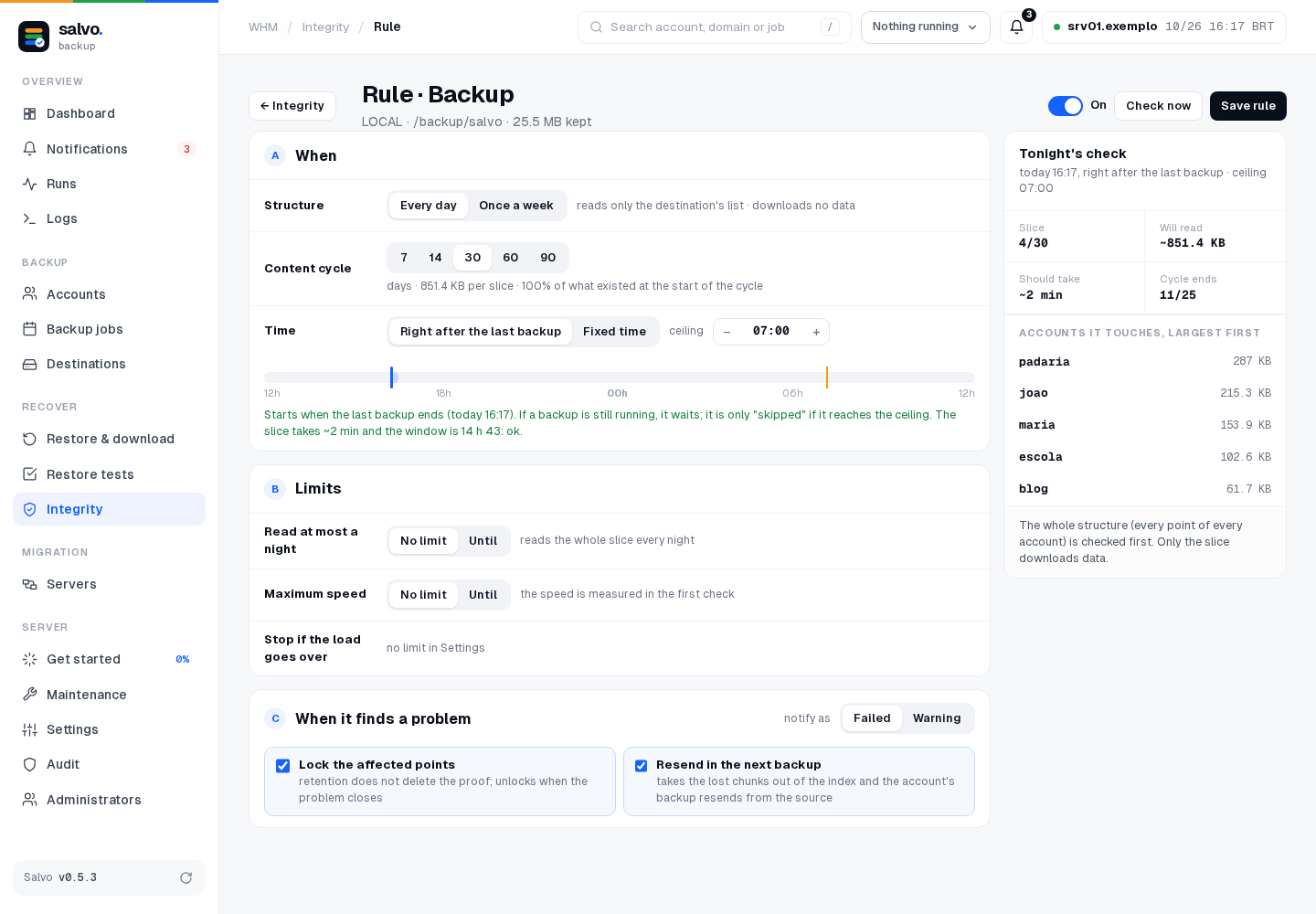
| Part | What you choose | Default |
|---|---|---|
| A · When | the structure every day or once a week; the Content cycle (7, 14, 30, 60 or 90 days); the Time: Right after the last backup or Fixed time, up to a ceiling, also on the 12h-to-12h bar (the same as the backup window), by dragging its ends | every day; 30 days; right after the last backup, ceiling 07:00 |
| B · Limits | Read at most a night, Maximum speed and the load limit from Settings | no limit |
| C · When it finds a problem | notify as Failed or Warning; Lock the affected points; Resend in the next backup | failure; lock; resend |
Tonight's check shows when it starts, the slice, how much it will read, how long it takes and when the cycle ends. Two warnings appear on their own: the cycle does not close (the nightly limit is too small for the chosen cycle) and the slice does not fit the window (at the measured speed, it does not finish by the ceiling), each with the way out: a larger limit or a longer cycle.
A check never runs while a backup or a restore test is running: it waits, and only becomes Skipped if it reaches the ceiling. At the ceiling, at the nightly limit or with high load, it stops and continues the next night from the same place. The first check verifies the whole structure (about 1 minute on a small destination) and the first content slice.
The check
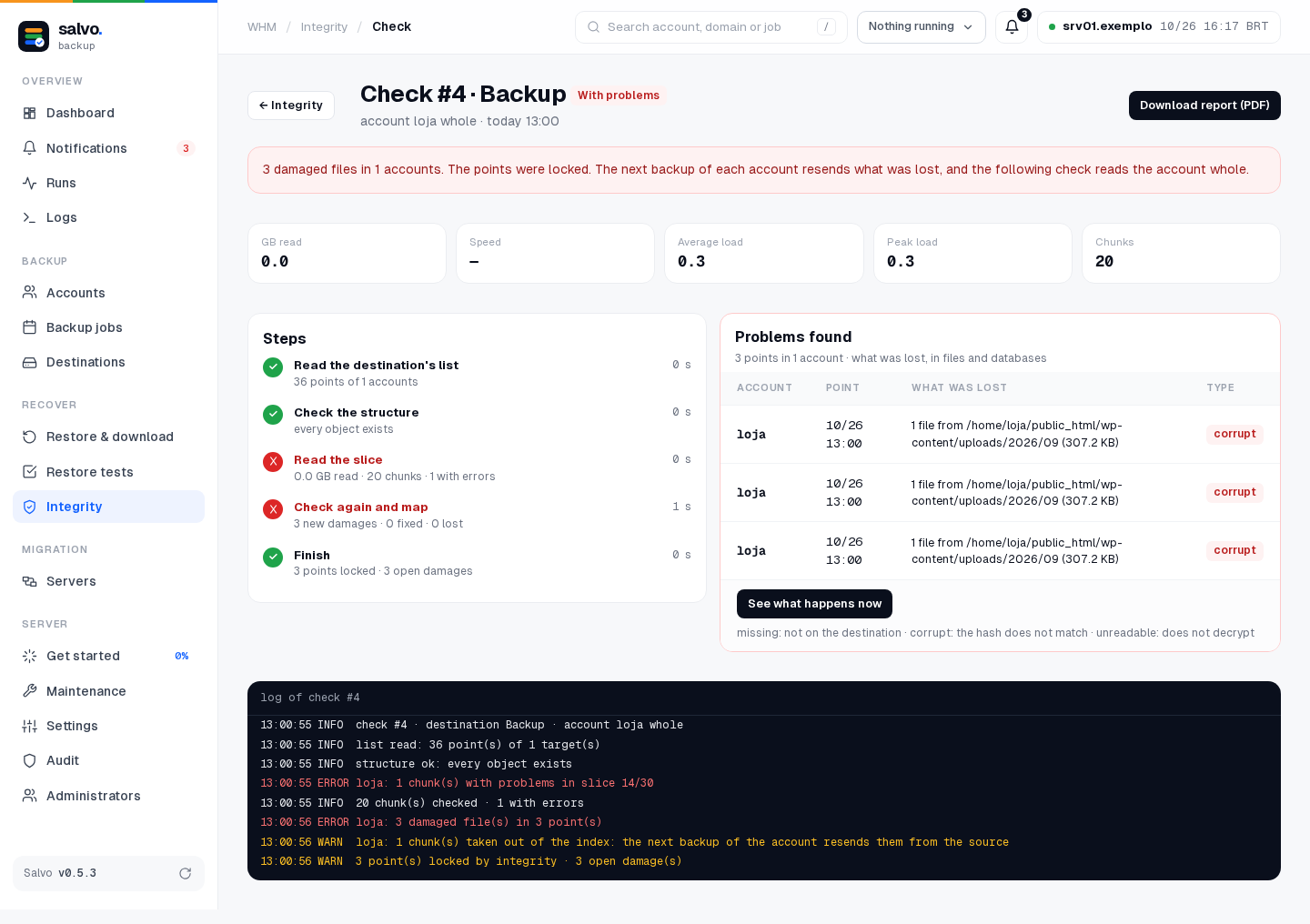
Clicking a check opens a drawer over the page (Esc closes it), with its steps (Read the destination's list, Check the structure, Read the slice, Check again and map, Finish), live while it runs; the numbers (read, with the new parts since the previous check; speed, load, pieces checked); the problems found; the log; and Download report (PDF). Each problem gives the account, the point, what was lost, in files and databases ("12 files of /home/loja/…/2026/09", "1 database dump"), and the kind: missing (the piece does not exist on the destination), corrupt (the hash does not match) or unreadable (it does not decrypt).
The account
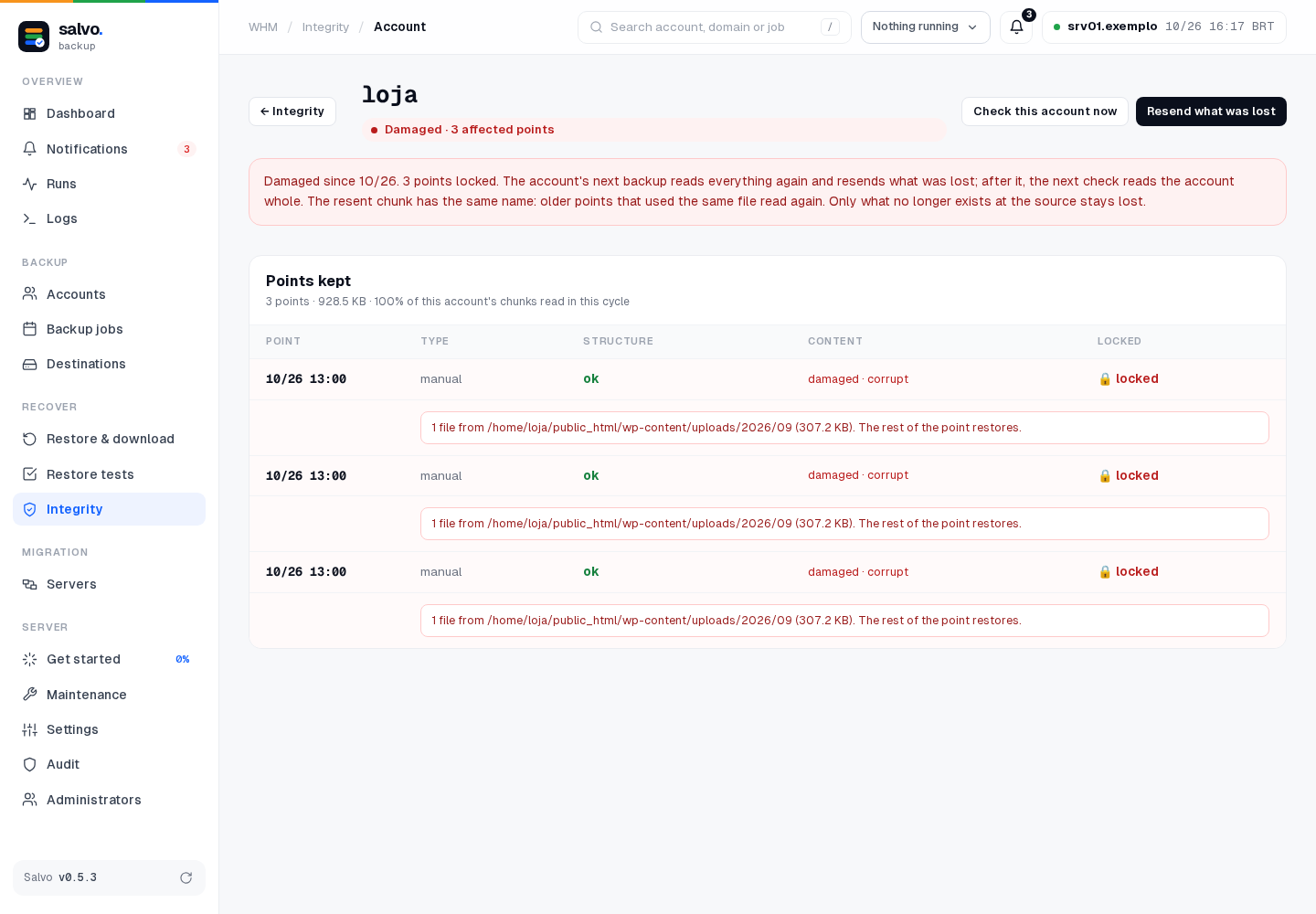
Clicking an account (in Per account or on the Point map) opens the account's drawer, over the page (Esc closes it): Trusted until, Points over time (from oldest to newest), the points with structure, content (checked end to end, to read: the new parts on the next check, damaged or not checked yet), Files and Size, the damage, Closed problems, Check this account now (structure and 100% of the content of this account only; on a single-repository destination, where accounts share the same parts, the check covers the whole repository and every account shows as checked) and Resend what was lost. The account's own page keeps the integrity badge at the top (with last backup: N files, X) and the Integrity line in the tests block; in its backup list, the damaged point is marked, with Use the closest good point. In the Restore & download assistant, a damaged point is never the suggestion while there is a good one, in every type: the suggestion moves to the closest point without damage (0.5.109).
A check running also shows in the activity center, as Integrity, with the step it is on; a click opens the check (0.5.109).
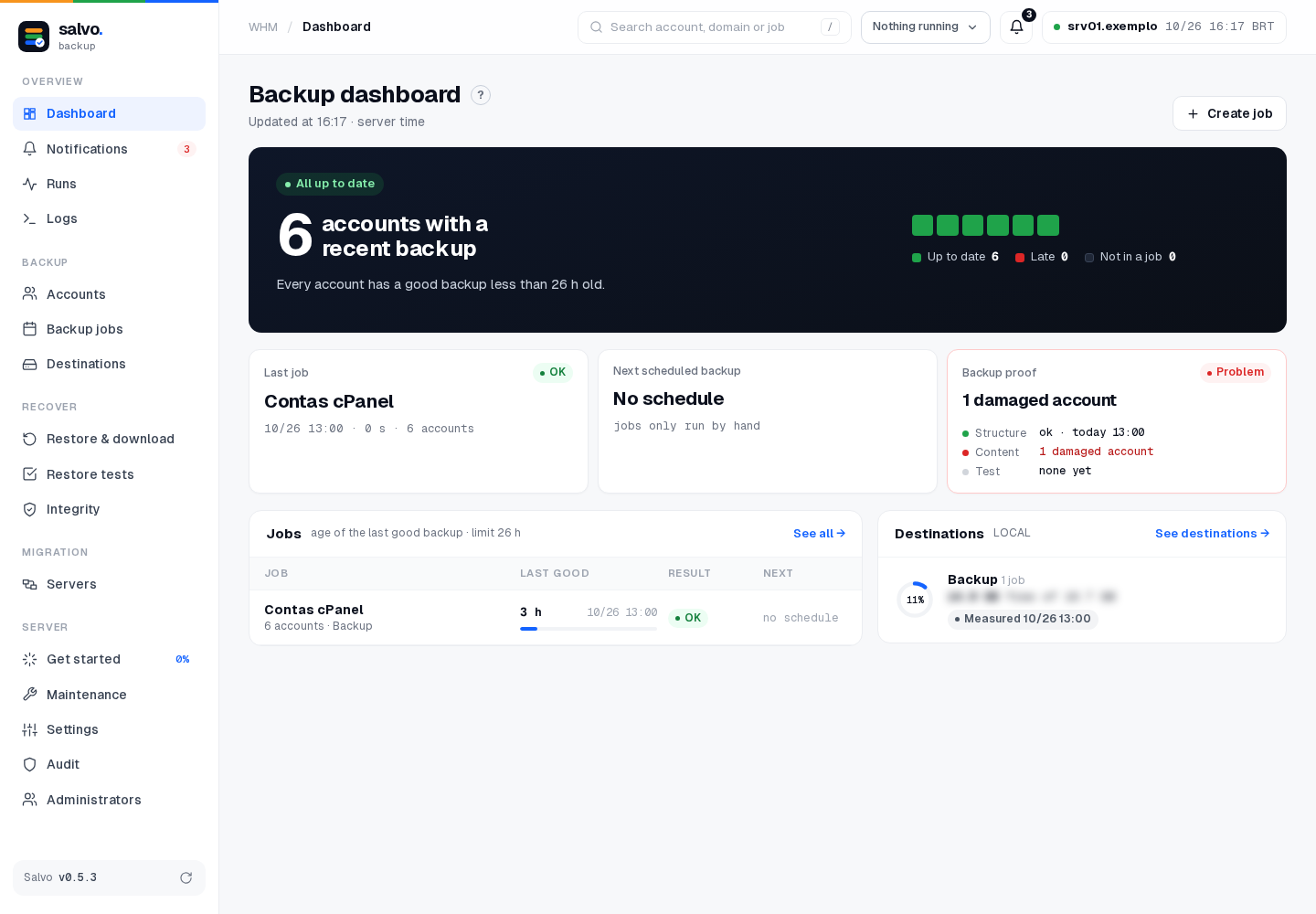
On the Dashboard, the Backup proof card brings the three proofs together (structure, content and test) and turns red when one of them fails. In the destination's drawer, Health tab, the Integrity block shows that destination's part.
When it finds a problem
- Found. The Damaged parts on the destination notice arrives (a failure, by e-mail, webhook and Zabbix; by default it does not go to Pushover, because the fix is automatic) and the problem stays open in Notifications. Before blaming, Salvo reads each bad piece again: what retention deleted in the middle of the check, or what reads fine the second time, leaves without an alarm. A network error never becomes damage: it becomes Could not check.
- Lock. The affected points are locked and retention does not delete them. It is the usual lock, marked as the integrity's; you can change it with Edit lock, in the account's backup list.
- You do not need to do anything. The bad pieces have already left the index: the account's next normal backup (tonight's) reads everything again and resends what was lost, from the source. To do it now, use Resend what was lost on the account. If the customer asks for a restore before that, use the closest good point.
- Check again. The next check reads the whole account and marks each damage as fixed or lost: no longer existed at the source.
- Close. The problem closes in both cases, with the Resend done notice (and how many files were lost for good), and the points are unlocked and follow normal retention. The resent piece has the same name, so the old points that used the same file restore again. Only what no longer existed at the source stays lost.
Could not check (destination down, expired credential) stays a warning, with the number of checks in a row in its title, and blames no account. The cycle continues from where it stopped when the destination comes back.
On the command line
# the summary: verdict, end-of-cycle forecast, whether you can restore today, destinations, "trusted until" per
# account and problems (or the API JSON with --json)
salvo integrity [--json]
# a destination's rule as JSON; turn it on or off; replace it with a JSON file (- = standard input)
salvo integrity-rule --destination N
salvo integrity-rule --destination N --on      # or --off
salvo integrity-rule --destination N --from rule.json

# check now: the destination's check (it also shows the new bytes read), or a whole account
salvo integrity-run --destination N
salvo integrity-run --destination N --account loja
# one check; the report of a check or of a complete cycle
salvo integrity-show --id N [--json]
salvo integrity-report --id N --out /root/integrity-N.pdf --lang en
salvo integrity-report --cycle N --lang en
# resend now what was lost on an account
salvo integrity-resend --destination N --account loja
To edit the rule, start from the integrity-rule --destination N output.
The manual action that restores the last backup of each item into a temporary folder and compares it with the server stays in Maintenance, now named Compare with the source. It compares with the server as it is now, so it also shows what changed after the backup. Integrity checks the destination.
Next: Recover a server.