Server configuration
The account backup keeps the customers' sites, mail and databases. But the server has a configuration of its own: the panel's options, Exim and Dovecot, Apache or LiteSpeed, PHP, MySQL, DNS, FTP, SSH, the firewall. When someone changes an option and mail stops, or an update overwrites a tweak, the question is always the same: what changed, and how was it before?
The panels keep part of this, but none restores it: cPanel says restoring the system files is manual, and so does DirectAdmin's system backup. The Server configuration job keeps the configuration service by service: Salvo detects what the server runs, you choose what to keep, and for each version the screen shows what changed, line by line.
● available in 0.5.135 restore a service: planned cPanel and DirectAdmin.
How each panel is kept:
- cPanel: a service that has a module in
cpconftool(cPanel's official tool, which restores with a test and rolls back by itself) is kept through its output, together with the source files. Ifcpconftoolfails, Salvo keeps the files and warns. - DirectAdmin: each service's source files and the CustomBuild customizations (
options.conf, thecustom/folder).
Salvo keeps the source, not what the panel generates from it (cPanel's exim.conf, for example, is generated:
restoring the generated file does not help, the panel overwrites it). Logs, files above 5 MB (with a warning), the
copies the admin leaves beside the original (*.bak, *.orig, *.old…) and the API tokens stay out.
In this version the job keeps the configuration and shows what changed. The Restore as it was in #N button shows disabled: restoring a service's whole configuration (keep the current one, apply, test and only then restart, rolling back by itself if the test fails) comes in the next stage. Until then, Download this file brings each file's kept version.
On the screen
BACKUP › Server configuration. With no job yet, the screen shows the Create the job card: choose the destination and click Create the job. It is created daily at 08:15, keeping 30 daily and 12 monthly (change it later in Backup jobs).
With the job created, the top shows the server, the panel, the system, the schedule and the destination, with Edit what to keep and Run now. Three tabs:
Changes
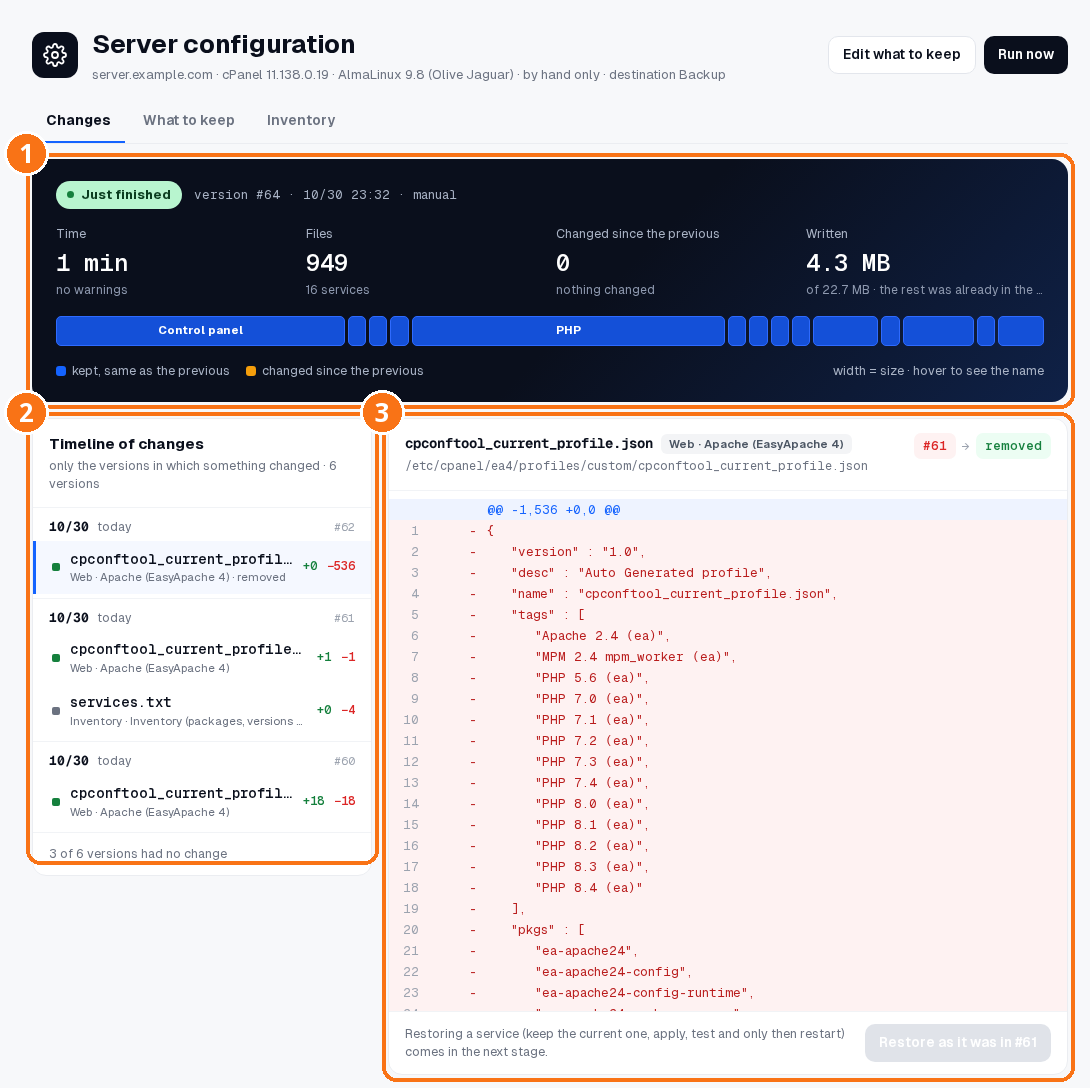
- The last version (Just finished, or Running now): the version number, when, whether it was scheduled or manual, the Time, the Files (and how many services), how many Changed since the previous and the Written (only what changed: the rest was already in the destination). The bar has one block per service, its width the size: blue = kept, same as the previous; orange = changed. When something changed, What to do now lists what appeared, was removed or gained and lost lines, with See what changed.
- Timeline of changes: only the versions in which something changed, each file with its service and the lines added and removed. Below, how many versions had no change.
- The difference: clicking a file shows the line-by-line difference from the previous version, with Download this file. A file with a password stays hidden (This file has a password…): Show the content shows it, and that is recorded in the Audit log (no app code asked).
What to keep
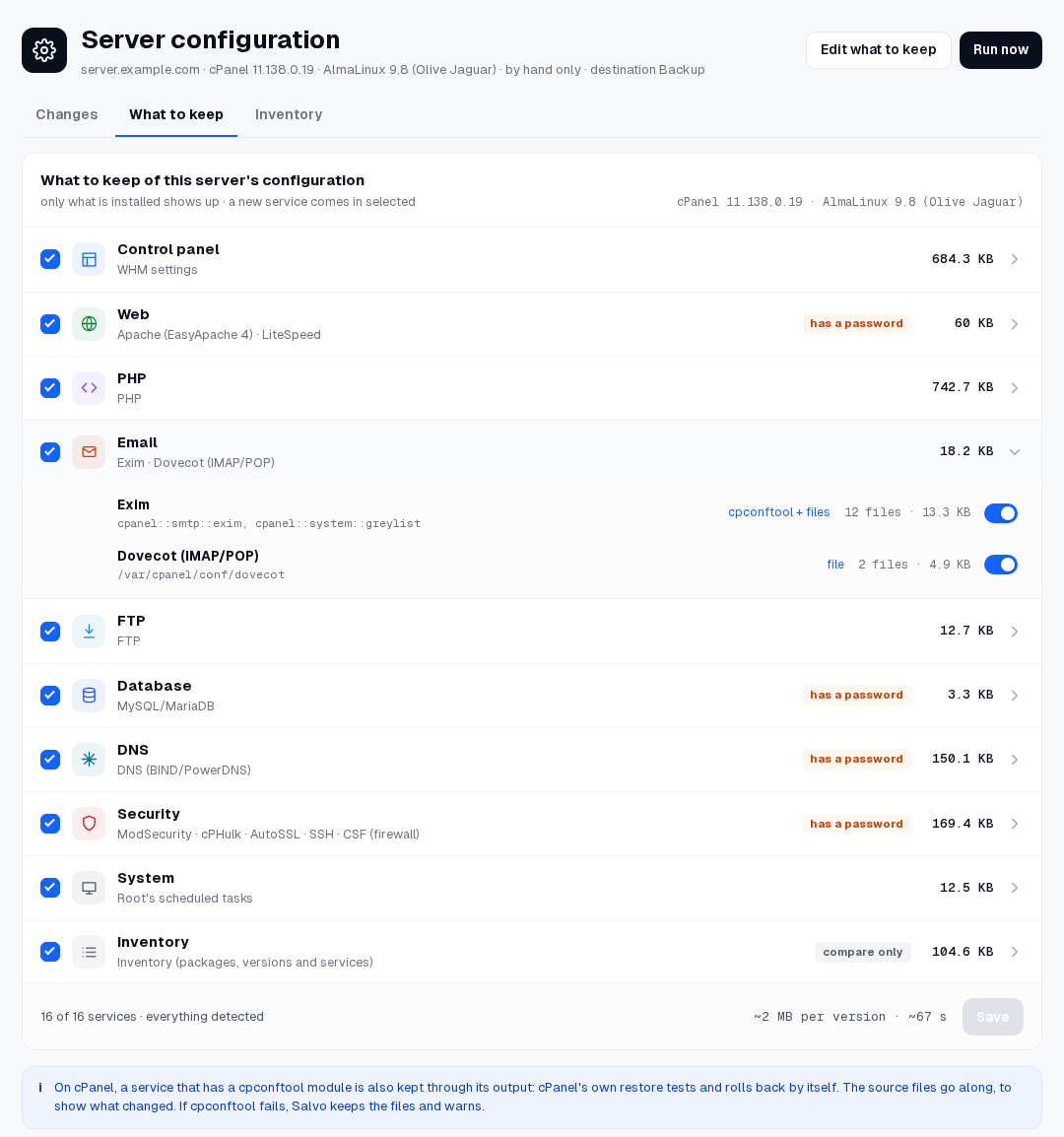
Services show in groups: Control panel (WHM or DirectAdmin settings, CustomBuild), Web (Apache, LiteSpeed, Nginx), PHP, E-mail (Exim, Dovecot, antispam), FTP, Database (MySQL/MariaDB), DNS, Security (SSH, ModSecurity, cPHulk, AutoSSL, CSF), System (root's scheduled tasks) and Inventory. Only what is installed shows up, and a new service comes in selected.
- Each group has its size and, when a file has a password, has a password. Opening the group shows each service: how it is kept (cpconftool + files or file), how many files, the size and the on/off switch.
- The footer says how many services are selected and the estimate per version (size and time).
- Save applies from the next version on.
Inventory
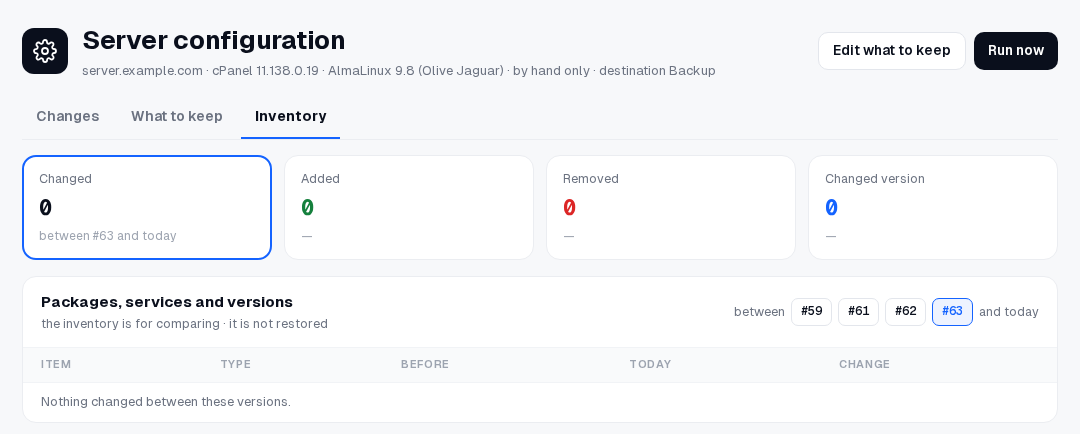
The server's packages, services and versions, for comparing (the inventory is not restored). The cards count what Changed, was Added, Removed and Changed version between the chosen version and today. By default the comparison is with the previous version; you can choose the oldest or one of the three most recent. The comparison shows from the second kept version on.
How much space and time
Measured on test servers: on cPanel, 16 services and 949 files, about 1 minute per version with a remote destination; on DirectAdmin, 15 services and 741 files, about 10 seconds with a local destination. Each version writes only what changed; Salvo's engine already has the rest on the destination.
On the command line
# the services detected on this server (group, how it is kept, files, size)
salvo server-config-services [--json]
# create the job: every detected service (new ones too), only some, or all but some
salvo job-add --kind server-config --name "Server configuration" --destination ID
salvo job-add --kind server-config --name "Server configuration" --destination ID --service exim --service ssh
salvo job-add --kind server-config --name "Server configuration" --destination ID --skip-service csf
# the kept versions
salvo server-config-versions [--job N]
# what changed in a version (--all: every file, not only the changed ones)
salvo server-config-changes --execution N [--all]
# a file's difference from the previous version
salvo server-config-diff --execution N --service exim --path /etc/exim.conf.local
The job's schedule is set like any job's: Schedules.
Next: First backup.