Follow a backup
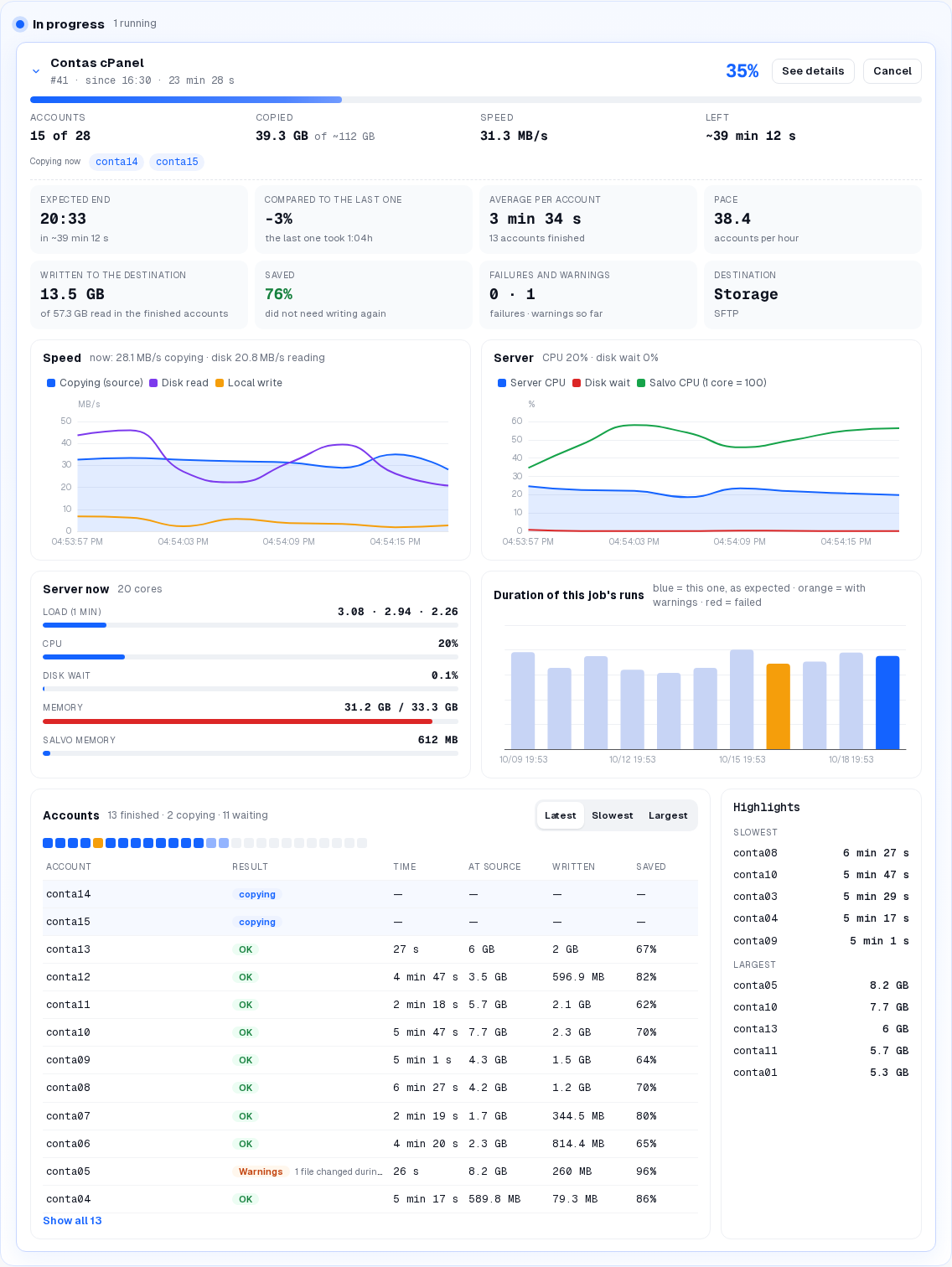
The Runs screen shows each backup while it runs, with live statistics: how far it is, when it ends, how fast it copies, how much the server is working and how each account went.
● available in 0.4.121 The menu shows how many backups are running now (since 0.4.119).
On the screen
Runs › block In progress › click the card of the backup: it opens in place (no window), with:
| Part | What it shows |
|---|---|
| Header | job, run number, since when, % done; See details and Cancel |
| Accounts · Copied · Speed · Left | accounts done of the total, how much was copied, current speed, time left; Copying now lists the accounts being copied |
| Expected end · Compared to the last one · Average per account · Pace | when it ends, faster or slower than the last run, time per account, accounts per hour |
| Written to the destination · Saved · Failures and warnings · Destination | what was written, what did not need writing again, failures and warnings so far, where it is going |
| Speed chart | Copying (source), Disk read, Local write |
| Server chart | Server CPU, Disk wait, Salvo CPU (1 core = 100) |
| Server now | Load (1 min), CPU, Disk wait, Memory, Salvo memory |
| Duration of this job's runs | the previous runs: blue = this one, as expected · orange = with warnings · red = failed |
| Accounts | tabs Latest, Slowest, Largest; columns Account, Result, Time, At source, Written, Saved |
| Highlights | slowest and largest accounts |
note
- The charts start drawing when the card is opened.
- On the first run of a job there is no estimate of the end: there is no previous run to compare.
On the command line
root@server
# the runs: running, next, totals and the period
/var/lib/salvo/salvo runs
# one run while it runs: the same data as the screen, in JSON (ID = the run number, e.g. 41)
/var/lib/salvo/salvo runs --live ID
# one run, finished or not: summary, accounts, compared with the previous
/var/lib/salvo/salvo run-show --execution ID