Replica and the 3-2-1-1-0 rule
The replica keeps a second copy of the backups on another destination. The jobs write to the primary, as always; Salvo copies to the secondary only the blocks that are not there yet. The accounts are not read again and the backup is not redone: the copy comes from the primary. That is why it weighs little on the server and transfers only what changed.
The secondary is a complete copy, restorable on its own: it has the same passwords in the vault and receives its own recovery copy. If the primary is lost, the secondary takes its place.
● released in 0.7The 3-2-1-1-0 rule
At the top of Destinations, the rule that says whether the backups survive a disaster, measured on this server. The score goes from 0 to 5, one point per item met:
| Item | The goal | How Salvo counts |
|---|---|---|
| 3 copies | at least 3 copies | the server + each destination with a backup written; the secondary counts after the first copy |
| 2 destination types | on 2 different types | Local, SFTP and S3 are different types |
| 1 off the server | one away from this server | the SFTP and S3 destinations |
| 1 immutable | one nobody can delete | an S3 destination with Object Lock that already has a backup written (or an S3 secondary with a lock, after the first copy) |
| 0 errors | zero errors when checking | the last Integrity pass; ? while there is none |
Each item shows today's number and, when something is missing, what to do (A destination of another type is missing (S3)., An S3 with Object Lock is missing.). The panel's title is the first thing to do; when there is a direct action, a button shows beside it (Replicate now, Create an S3 destination). A failed replica turns the copies item red; a late one, orange.
An example of the full rule: an SFTP on another server as the primary and an S3 bucket with Object Lock as the secondary give 3 copies (server, SFTP, S3), 2 types, 2 off the server and 1 immutable. With Integrity up to date, 5 of 5.
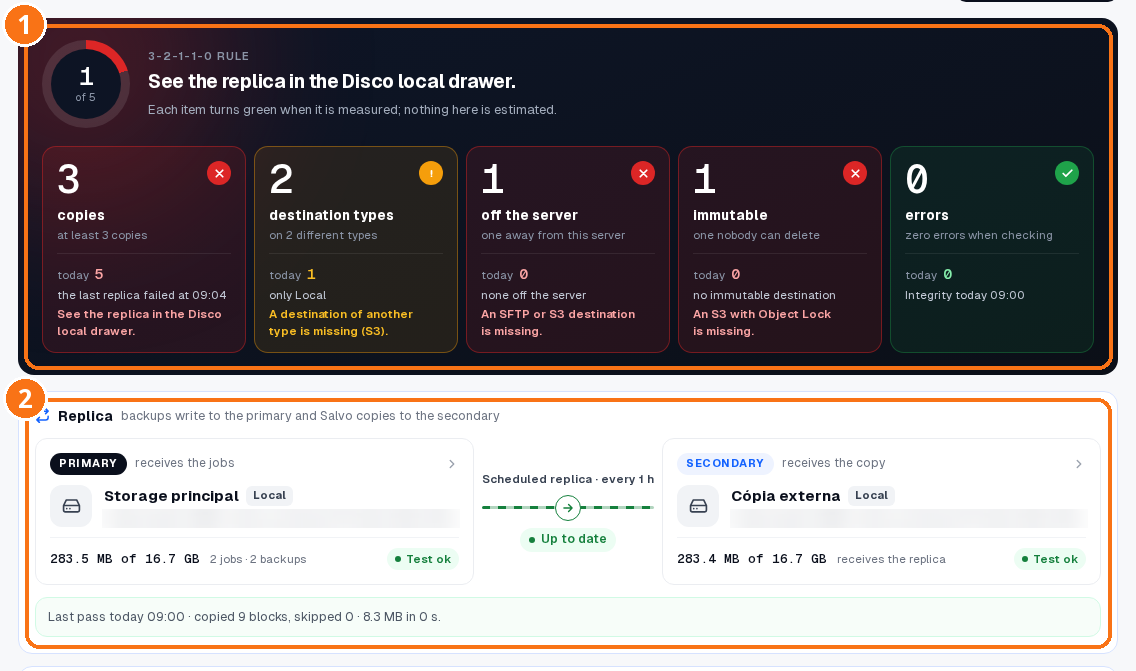
- The rule, with the score and the five items.
- A replica pair: the primary (receives the jobs), the mode and the state in the middle, the secondary (receives the copy) and, below, the strip with the last pass.
Turn on the replica
Destinations › click the primary › Replica and recovery › Turn on a replica. The list shows the other destinations; only a destination that is:
- empty (no jobs and no backups): that is why you create the S3 destination and turn on the replica before pointing any job at it;
- writable, enabled and not archived;
- not the secondary of another one, nor replicating to another one (chaining is not supported)
can be the secondary. Those that cannot are greyed out, with the reason (Not empty: 1 job · 2 backups). Choose the secondary, the mode and Turn on the replica. The first copy (seeding) starts right away, in the background: the notice brings Follow.
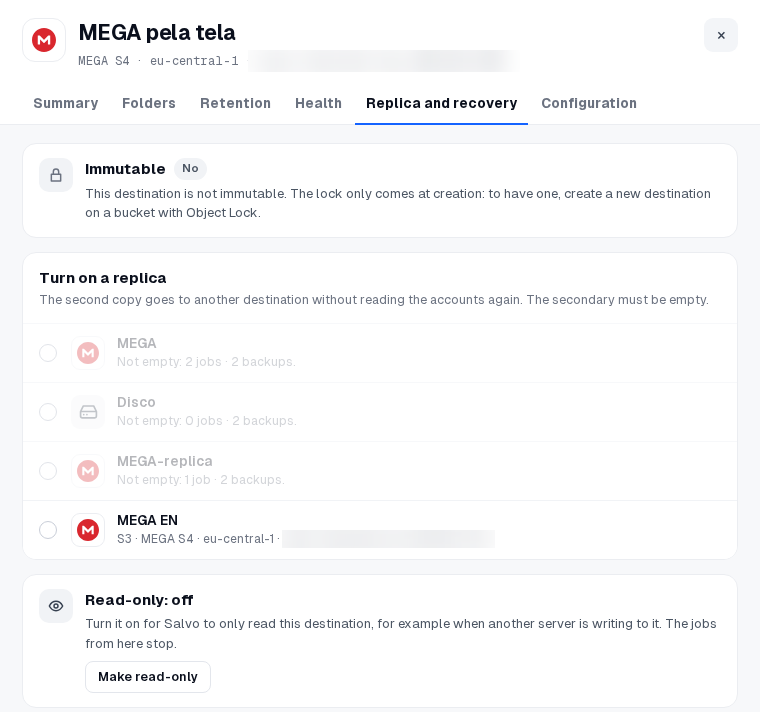
The same link can be made in the last step of New destination, in Receive the replica of another destination?.
The modes
| Mode | What it does |
|---|---|
| Scheduled replica (default) | the backup writes only to the primary; the replica copies what changed every 30 min, 1 h, 6 h or 24 h. Does not weigh on the backup |
| Live mirror · tolerant | each backup writes to both. If the secondary fails, the backup goes on and the replica catches up later |
| Live mirror · strict | each backup writes to both. If the secondary fails, the backup fails. For those who must prove every copy reached both |
Both mirrors are under Advanced: live mirror. Planned for later, no date: the replica done by a dedicated server, which takes the copying work off the customer's server. planned
Follow the first copy
The Replica section of Destinations and the Replica and recovery tab show the pair's state:
| State | |
|---|---|
| Not seeded yet | the secondary is linked but has not received the first copy |
| Replicating (blue) | a pass in progress: First copy or Pass in progress, with what was copied so far |
| Up to date (green) | the last pass ended well: Last pass today 09:00 · copied 9 blocks, skipped 0 · 8.3 MB in 0 s |
| Behind since (orange) | scheduled: no good pass for more than 2 intervals; mirror: since the backup that left the secondary behind. Salvo tries again every 5 min |
| Failed (red) | the last pass did not finish; the strip says the error and brings Try again. The backup on the primary went on normally |
During the first copy:
- One folder per account (the default): each account is a repository, and the strip shows account i of N, the current account and the MB copied so far. There is no total or forecast: what is left of the next accounts is only known when they are listed.
- Single repository: the strip shows the MB copied of the total, with the bar and the forecast of what is left.
If the first copy drops halfway, the next pass continues where it stopped: it compares both sides and copies only what was missing. Until the first copy ends, the secondary does not count in the rule (Counts when the first copy finishes.).
Replicate now
Replica and recovery › Replicate now runs a pass outside the schedule, in the background: the notice brings Follow and the pass shows in Runs › Maintenance. At the end, the seal goes back to Up to date with the last pass.
The tab shows three blocks:
- Immutable: whether this destination has a lock (the mode and the days) or not.
- Replica to (secondary): the secondary, the mode, the state with the last pass and the secondary's protection; Replicate now, Change the mode and Turn off the replica.
- Read only: used when recovering a server.
While the replica is on, the secondary receives no job and cannot be deleted or disabled.
Change the mode changes the mode or the interval. Turn off the replica asks for confirmation: the secondary keeps what it has and stops receiving; the primary's backups do not change.
Since 0.7.155 Integrity checks an S3 secondary by comparing it with the primary, without downloading anything, and the replica copies again whatever is missing or different: see The replica's secondary on S3.
The replica never deletes on the secondary: what retention and maintenance take out of the primary stays on the secondary. It is always a superset of the primary, which is safe for recovery, but takes more space over time.
On the command line
# turn on: primary 1 → secondary 3, scheduled every 1 h
salvo destination-replica --destination 1 --to 3 --mode scheduled --every 1h
# live mirror (mirror = tolerant, mirror-strict = strict)
salvo destination-replica --destination 1 --to 3 --mode mirror
# a pass now (the first one seeds the secondary)
salvo replicate --destination 1
# the state: none, run, ok, late or fail, the last pass and the pass in progress
salvo destination-replica --destination 1 --status
# turn off (the secondary keeps what it has)
salvo destination-replica --destination 1 --off
# the 3-2-1-1-0 rule (or the screen's JSON with --json)
salvo destination-rule
Next: Recover a server.