Remote destinations (S3)
From 0.7 on, a destination can also be an S3-compatible bucket: Amazon S3, Wasabi, Backblaze B2, Cloudflare R2, MEGA S4, your own MinIO and others. The backup reaches the provider the same way it reaches SFTP: encrypted, deduplicated and restorable part by part. With Object Lock, the backups are immutable: nobody deletes them, not even with this server's key.
This page covers the first two steps: update to 0.7 and create the S3 destination. The next step is to turn on the replica, which copies the destination you already use to S3.
● released in 0.71. Update to 0.7
0.7 is on the common channel: update as usual, from the Update drawer or with salvo self-update (see
Updates). Open Salvo in WHM and check the version at the bottom of the menu.
Whoever tested 0.7 through --url https://salvobackup.com/download/v07 must go back to the common channel, because the
address is saved and the test channel no longer receives versions:
salvo self-update --state /var/lib/salvo --url https://salvobackup.com/download
Before creating: what you need from the provider
Salvo does not create the bucket. In the provider's panel, first:
- Create the bucket. If you want immutable backups, turn on Object Lock when creating the bucket: with most providers it cannot be turned on later.
- Create an access key (the access key and secret key pair), preferably restricted to that bucket.
- Write down the region of the bucket. With some providers it belongs to the account, not to the bucket (Backblaze B2).
The Destinations screen in 0.7
Destinations changed: at the top, the measured 3-2-1-1-0 rule; below it, each primary → secondary pair of the replica; then the list of destinations and the daily maintenance of each one.
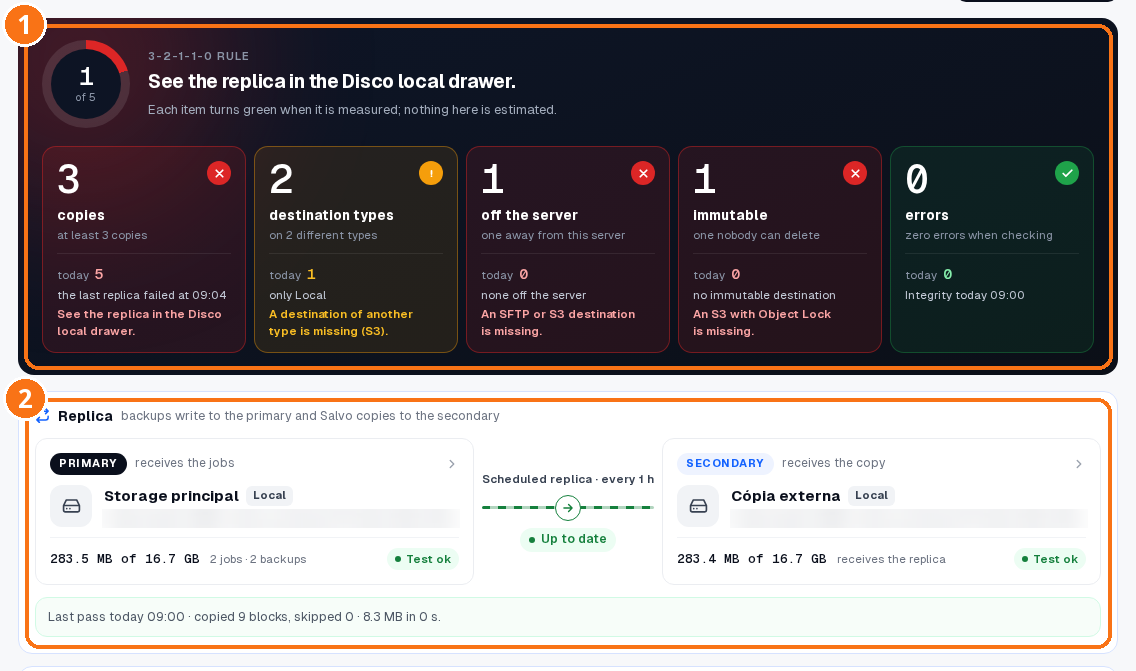
- 3-2-1-1-0 rule: the score from 0 to 5 and the five items (copies, destination types, off the server, immutable, errors), each with today's number. Nothing is estimated: an item only turns green once it was measured. In the picture, a test server with local destinations only: a destination of another type, one off the server and an immutable one are missing.
- Replica: the primary (receives the jobs), the mode and the state in the middle, and the secondary (receives the copy). Explained in Replica and the 3-2-1-1-0 rule.
2. Create the S3 destination
The video shows the whole path in a little over a minute, with a test bucket:
Destinations › New destination opens a six-step wizard: Type, Provider, Where, Immutable, Test and Replica.
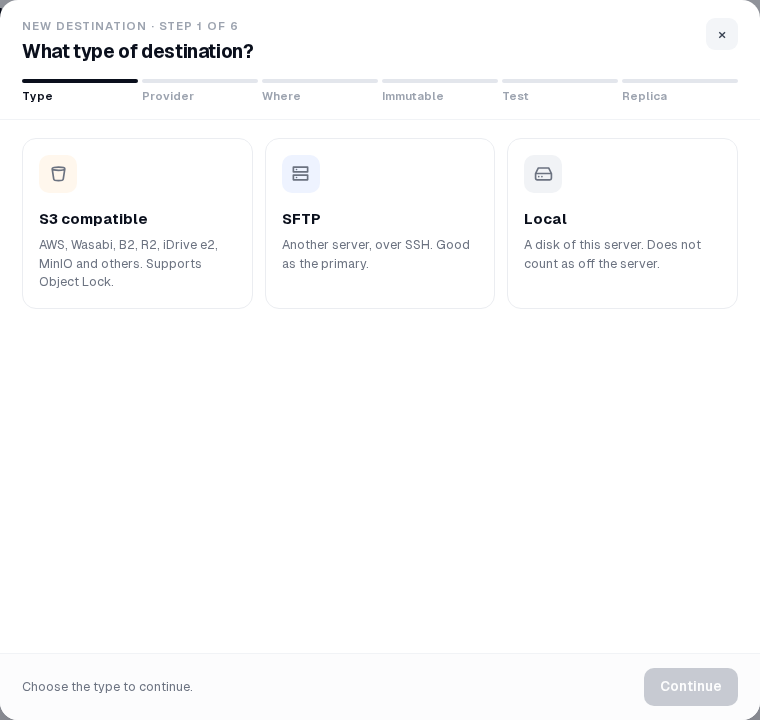
Type. Choose S3 compatible. (SFTP and Local work as before, in a four-step wizard.)
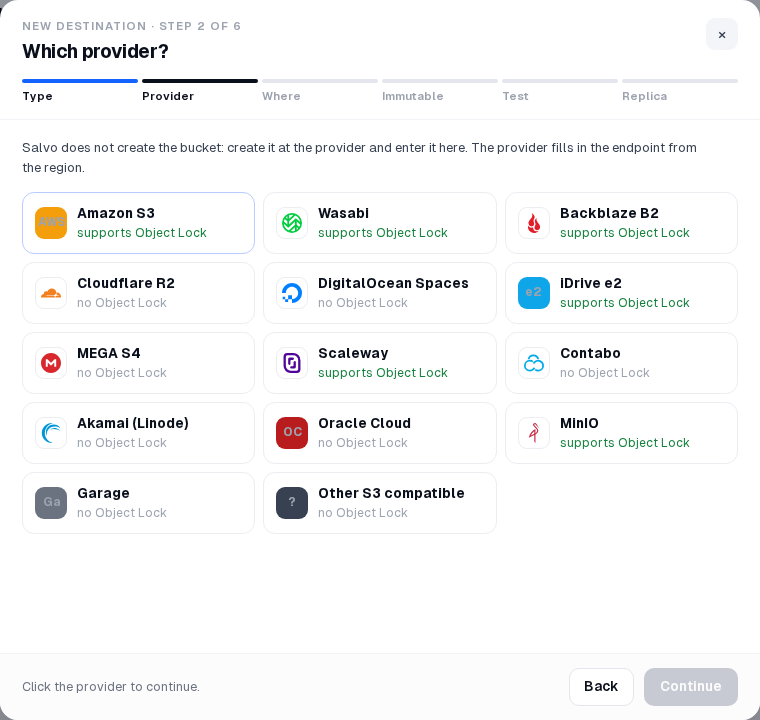
Provider. Click the provider; it fills the endpoint from the region. Under the name, whether it supports Object Lock. An S3 that is not on the list goes in as Other S3 compatible, with the endpoint written by hand.
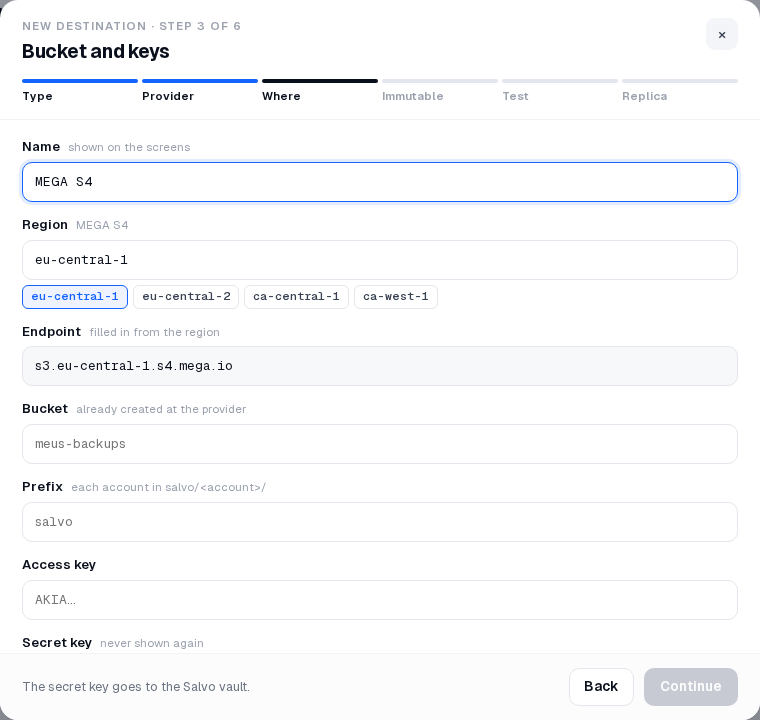
Where. The bucket details:
| Field | |
|---|---|
| Name | shows on the screens |
| Region | the buttons under the field bring the provider's most used regions; any other is accepted |
| Endpoint | filled from the region; when the provider has no template (R2, iDrive e2, Oracle, MinIO, Garage, Other), copy it from its panel |
| Bucket | already created at the provider |
| Prefix | the folder inside the bucket, salvo by default; each account goes in salvo/<account>/ |
| Access key | the key id; it stays visible on the screen, so you can recognize it |
| Secret key | goes to Salvo's vault and is never shown again |
When the provider has a quirk, a blue notice shows under the fields (see the table). Advanced brings No TLS (internal network only), Accept an unverified certificate (self-signed certificate), the Layout (one folder per account or single repository, which does not change later), the Compression and the Local cache, the same as in Destinations.
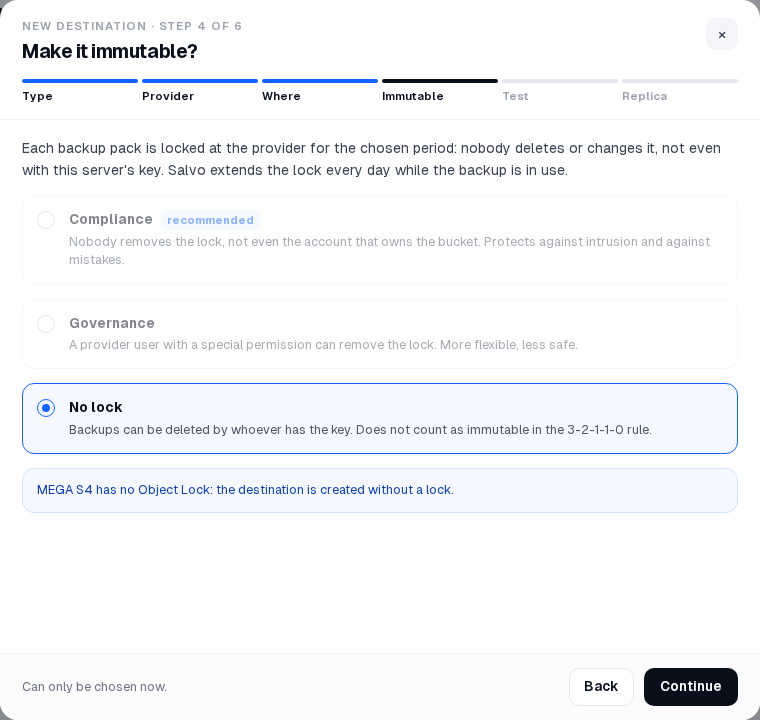
Immutable. Only for S3, and it can only be chosen now: once created, the destination does not change its lock.
| Option | |
|---|---|
| Compliance (recommended) | nobody removes the lock, not even the account that owns the bucket; the term only ends by itself. Protects against intrusion and against mistakes |
| Governance | a provider user with special permission can remove the lock. More flexible, less safe |
| No lock | the backups can be deleted by whoever has the key. Does not count as immutable in the 3-2-1-1-0 rule |
With a lock, Lock days goes from 2 to 3,650 (default 30). Each backup copy stays locked at the provider for that
term, and Salvo extends the lock every day while the backup is in use. The bucket must have been created with
Object Lock at the provider; otherwise the test fails at the object_lock step. A provider without Object Lock: the
first two options are greyed out and the destination is created without a lock.
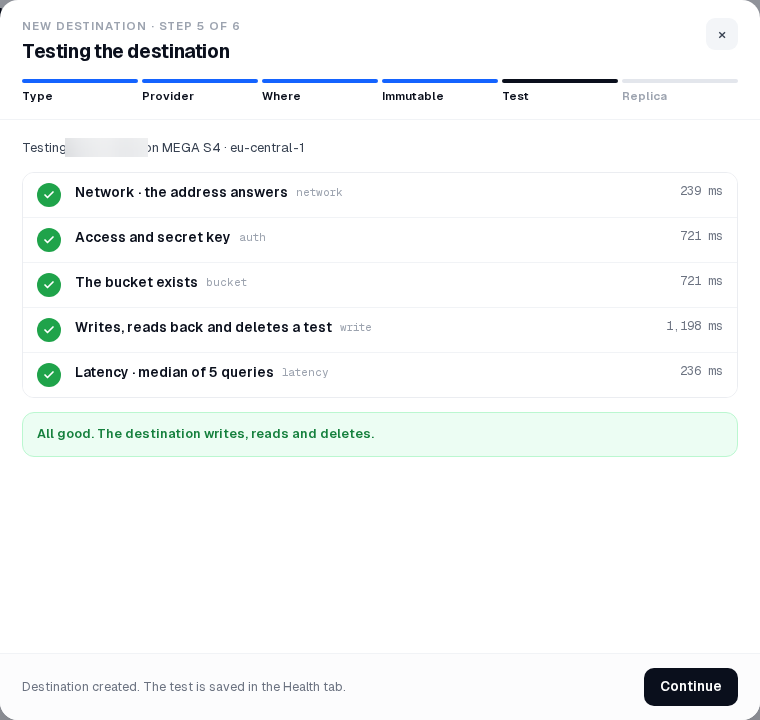
Test. Salvo tests step by step and creates the destination only if everything passes; if something fails, nothing is created and Fix goes back to Where.
| Step | |
|---|---|
network | the address answers |
auth | the access key and the secret key match |
bucket | the bucket exists |
object_lock | with a lock only: the bucket was created with Object Lock |
versioning | a warning, when the bucket keeps old versions: check the lifecycle rule at the provider |
write | writes, reads back and deletes a test file |
latency | the median of 5 queries |
owner | who writes here: a warning when another server writes to this destination (0.7.4; see Two servers on the same destination) |
The most common failures come explained: The secret key does not match (SignatureDoesNotMatch) (copy the whole key, with no space at the end) and The access key does not exist at the provider (InvalidAccessKeyId). The result is kept in the destination's Health tab.
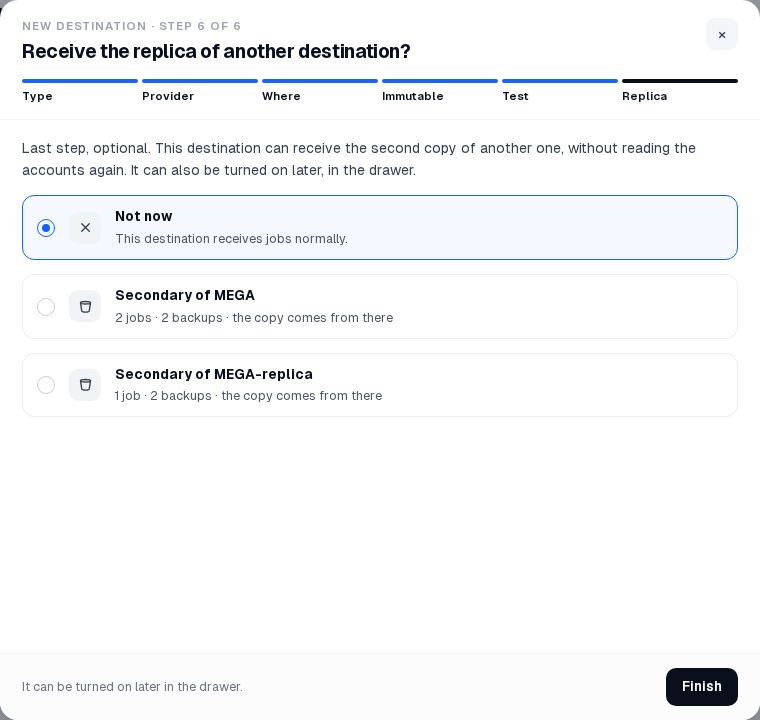
Replica. Last step, optional: the new destination can receive the replica of a destination that already has jobs. Choose Secondary of (destination) and the mode, then Turn on the replica and finish; or Not now and Finish. It can be turned on later from the primary's drawer, which is the path described in Replica and the 3-2-1-1-0 rule.
The S3 destination in the drawer
The drawer has the same tabs as before plus Replica and recovery: Summary, Folders, Retention, Health, Replica and recovery and Configuration. On S3, Space shows the used in the bucket and the old versions (when the bucket keeps versions), with no total or free: the provider charges for what is stored. The volume card (the ring) does not show for S3. Measure now measures right away, in the background.
The providers
The endpoints and regions on the list help you fill in the form; the test is what tells the truth (the
object_lock step, for instance, asks the bucket itself). The providers marked as tested went through the Salvo
engine's integration test and through end-to-end backups and restores.
| Provider | Object Lock | What to know |
|---|---|---|
| Amazon S3 | yes | |
| Wasabi · tested | yes | charges every object for at least 90 days: deleting backups earlier does not lower the bill |
| Backblaze B2 · tested | yes | use an application key restricted to the bucket (the Master Application Key does not work over the S3 API); the region belongs to the account and is in the bucket's endpoint |
| Cloudflare R2 | no | |
| DigitalOcean Spaces | no | |
| iDrive e2 · tested | yes | the endpoint is shown in the e2 console for each region (e.g. s3.us-southeast-1.idrivee2.com) |
| MEGA S4 · tested | no | the object storage of MEGA Pro plans, not the MEGA drive; bucket and key in the S4 panel |
| Scaleway | yes | |
| Contabo | no | |
| Akamai (Linode) | no | |
| Oracle Cloud | no | |
| MinIO · tested | yes | self-hosted: write host:port; No TLS only on the local network |
| Garage · tested | no | self-hosted: host:port of the S3 API (3900 by default); the region is the s3_region of garage.toml |
| Other S3 compatible | depends |
On the command line
The secret key comes from a file (an argument shows in ps). The same test runs before saving: if it fails, the
destination is not created.
# the secret key in a root-only file
install -m 600 /dev/null /root/s3-secret && vi /root/s3-secret
# a destination on MEGA S4 (the provider fills the endpoint from the region)
salvo destination-add --name mega --type s3 --provider mega --region eu-central-1 \
  --bucket my-backups --path salvo --access-key KEY --secret-key-from /root/s3-secret
# an immutable destination in a bucket created with Object Lock (fixed at creation)
salvo destination-add --name wasabi-lock --type s3 --provider wasabi --region us-east-1 \
  --bucket backups-lock --access-key KEY --secret-key-from /root/s3-secret \
  --object-lock COMPLIANCE --object-lock-days 30
# a provider off the list: the endpoint by hand
salvo destination-add --name own-s3 --type s3 --provider outro --endpoint s3.example.com:9000 \
  --region us-east-1 --bucket backups --access-key KEY --secret-key-from /root/s3-secret
salvo destination-test --destination ID
salvo destination-measure --destination ID
Other S3 options: --no-tls (http, local network only), --insecure-tls (a certificate that does not verify), plus
those of any destination (--mode, --compression, --cache-mb).