Turn on performance_schema
● available in 0.8.33 cPanel and DirectAdmin, MySQL and MariaDB on this server.
performance_schema is a part of MySQL and MariaDB that counts what happens inside the database server, including
how many writes each table received. With it on, Salvo comes to know whether each table of the database received any
write since the last copy, and which InnoDB databases stayed the same; with it off, there is no way to know.
performance_schema is a startup variable: it only takes effect after restarting MySQL, a short stop of every
site that uses the database. The cost is a little more memory used by MySQL.
With the suggestion card
When this server backs up databases from a MySQL on this same server and performance_schema is off, the
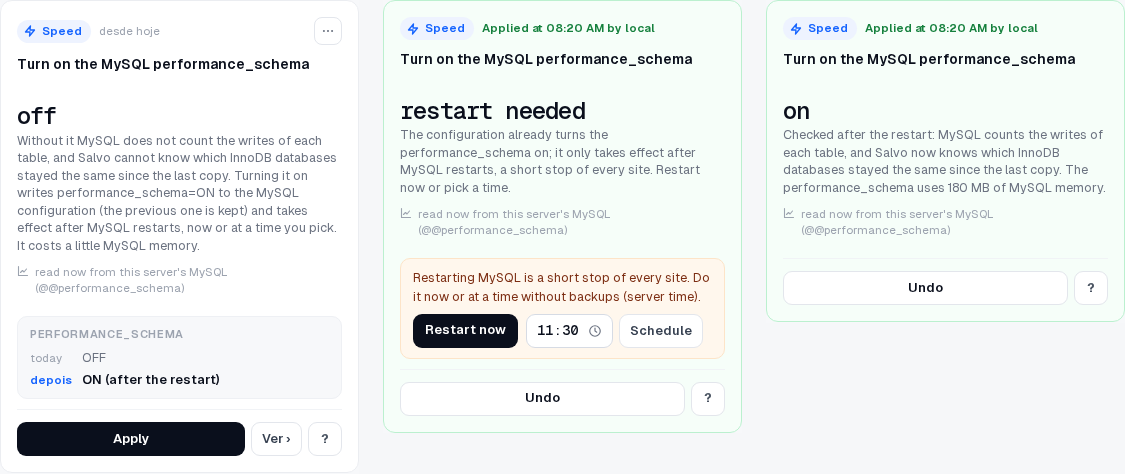
Turn on the MySQL performance_schema card shows in the suggested improvements
(Dashboard and Salvo health › Suggested improvements), with off and the change OFF → ON (after the restart).
- Apply writes
performance_schema=ONto the MySQL configuration (the previous one is kept) and the card shows restart needed. - Restart MySQL: Restart now (it asks Yes, restart now; the restart runs in the background and shows in Runs), or choose a time and Schedule (server time; if a backup is running at that time, it waits for it to finish). Cancel the schedule removes a scheduled restart.
- After the restart Salvo checks: the card shows on, with the memory
performance_schemauses, and Undo puts the previous configuration back (which also takes effect at the next restart).
If the restart does not turn it on because another line of the MySQL configuration turns it off, the card says so: restarting again does not fix it, check the configuration by hand (below).
On the command line
# turn it on in the MySQL configuration (--undo puts the previous one back)
salvo improvement-apply --id mysql-ps
# the state: on or off, and whether a restart is scheduled
salvo mysql-restart
# restart MySQL now (refused while a run or restore is running), or at a server time, or cancel the scheduled one
salvo mysql-restart --now
salvo mysql-restart --at 03:30
salvo mysql-restart --cancel
By hand
-
Check:
mysql -e "SELECT @@performance_schema;";1means on,0off. -
In
/etc/my.cnf(the same path on cPanel and DirectAdmin), in the[mysqld]section:/etc/my.cnf[mysqld]performance_schema = ON -
Restart MySQL: on cPanel,
/scripts/restartsrv_mysql; on DirectAdmin,systemctl restart mysqld(on some servers the service ismariadb). -
Check again: it must show
1. If it still shows0, another file is turning it off: look for anotherperformance_schemaline in/etc/my.cnf.d/.