Mail center
Mail is what customers feel the most when it goes missing, and it is what changes the most: messages come in and go out all day. The account backup takes the mail along, but once a night. The Mail center puts in one place everything about the mailboxes: how many there are, how much they take, what came in and went out since the last read, which ones have no backup, the contacts and calendars, the jobs that copy mail and cPanel's mail nodes.
In cPanel, an account's mail can live on another server: a mail node (a Linked Node with the Mail profile). In that case, the mail folder left on this server is only an old copy: the account backup copies that copy, not the real mail. The Mail center shows that gap and closes it with the mail job.
● available in 0.5.77 ● mail node and mail job: 0.5.81 to 0.5.94 ● space and projection: 0.5.90 ● every node, unlink with confirmation: 0.5.108 and 0.5.109 cPanel and DirectAdmin (mail node: cPanel only; contacts and calendar: cPanel only).
The Mail center only reads: nothing in the mailboxes changes. It shows counts and folder names, never subject, body, contact name or event title.
On the screen
BACKUP › Mail center. At the top, the last read (Read … · N mailboxes in S s · new and deleted since …), with Read now and the search by mailbox, domain or account. Salvo reads the mailboxes by itself after each account backup and once a day; a read that fails tries again after an hour. While it reads, the center shows the steps (mailboxes on this server, then on the node, then saving), the account of the moment, the mailboxes read and the messages counted.
Six tabs:
| Tab | What it shows |
|---|---|
| Overview | the coverage band (All covered, Mailboxes outside the mail job, Mail job missing, Node missing, Mailboxes without backup) with the donut; new and deleted messages against the usual; the mail space; restores in 30 days; In and out, per day; Where the space is (Trash and Spam apart); Mail size in 90 days; Largest mailboxes with quota use; Gone since the previous read; Mail backup space on the destination; Latest mail restores |
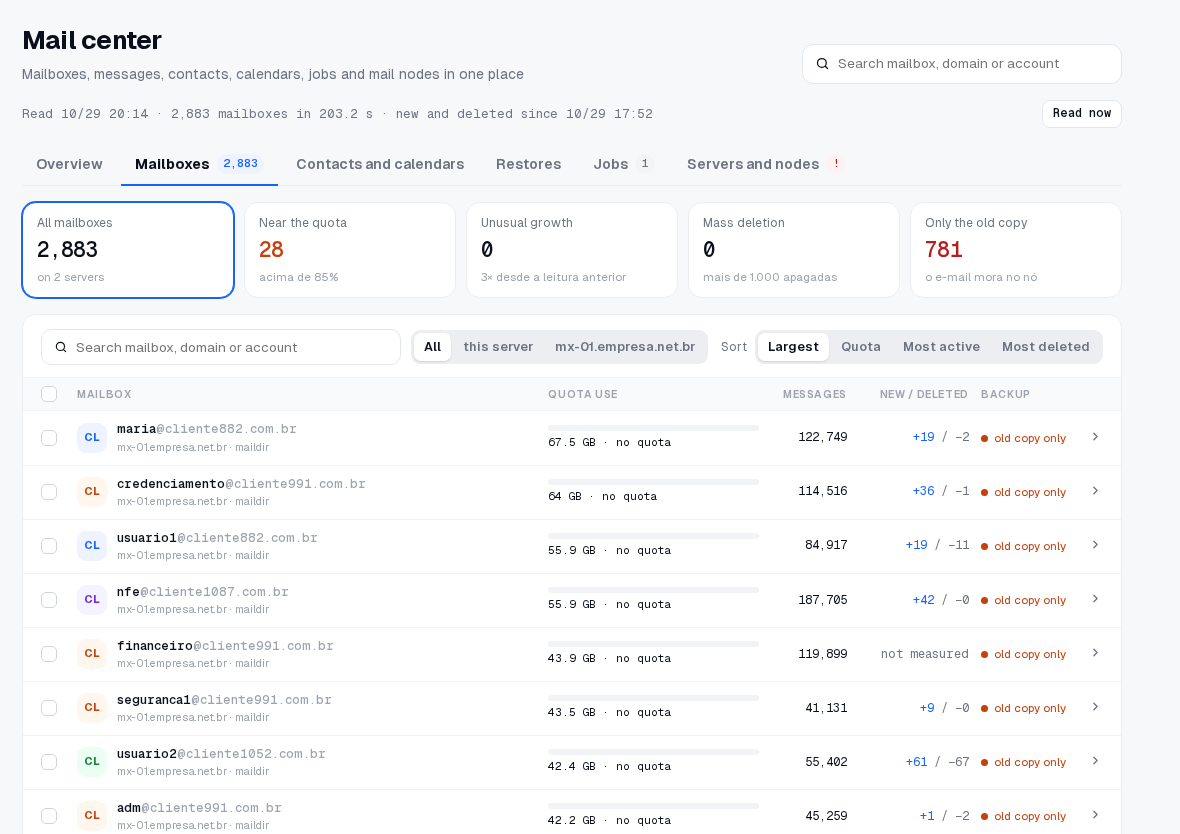
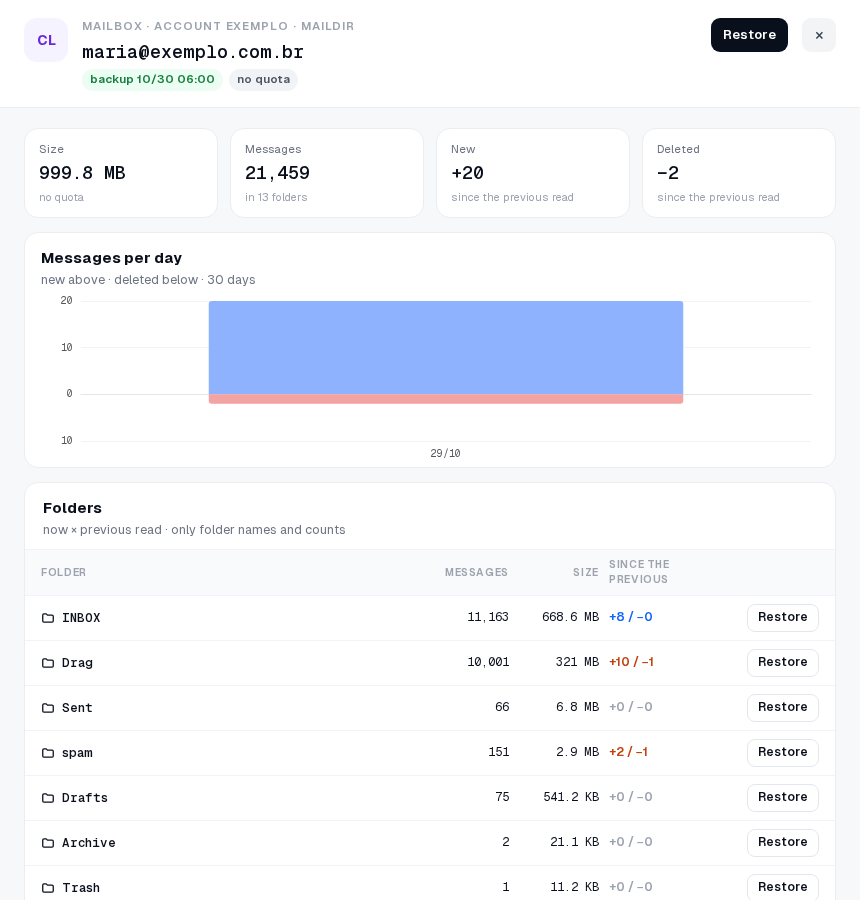
| Mailboxes | the list, with filters (quota almost full, drop, grew, old copy only, no backup), the server and the order; a click opens the mailbox: folders now against the previous read, messages per day, contacts, calendar, the last reads and Restore |
| Contacts and calendars | per mailbox: contacts (CardDAV) and address books, events (CalDAV) and calendars, and what Roundcube keeps in its database (the webmail address book and calendar) |
| Restores | the mailbox restores: in progress, messages brought back and time to finish in 30 days, and the history |
| Jobs | the jobs that take mail: the mail job and the account jobs with the Mail part |
| Servers and nodes | this server and each mail node: accounts with their mail there, the link, the last test, writing (restore on the node) and the mailboxes on the node |
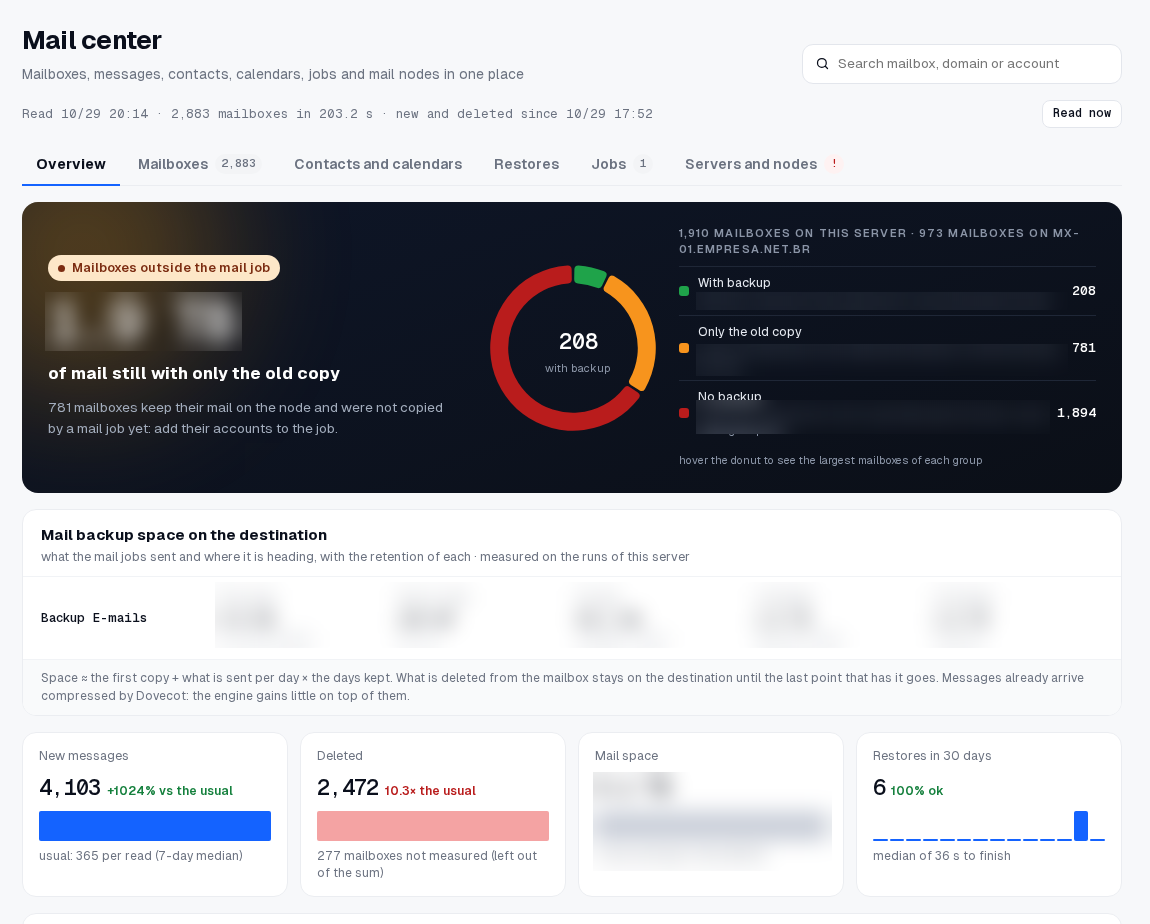
First steps. While something is missing, the center shows the steps instead of the alerts, each checked against what exists and with its action button: Read the mailboxes, Link the node (when there is one), Create the mail job, Make the first copy and Put it on a schedule. It disappears when all are done.
On the first read there is no comparison: the cards say the first read (no comparison yet). The usual (the 7-day median) shows after a few days of reads, and a folder without a count stays not measured, never zero.
The mail node
A cPanel mail node is read and copied through the node's own WHM, with the token this WHM already keeps for it: nothing is installed or changed on the node (no service, key or rule). The Salvo on this server reads the mailboxes on the node as each account's user and writes to the destination; only what is new goes through here, in a work folder cleared after each mailbox.
- Servers and nodes › Link the node: three steps (what happens, Link and test, done). The test shows the cPanel version, the API and command times and the node's load. With more than one node, they all show in a row of tabs at the top of the tab, each with its state (Node linked, Node not linked, Link failed); pick the node there (0.5.108; before, only the first one showed).
- When linked, Salvo already reads the mailboxes on the node in the background: the center starts measuring the real mail. If there is no mail job yet, the last step offers Create the mail job (or Not now), which opens the assistant on the E-mails kind and comes back to the center after creating (0.5.109).
- Test link checks again; Unlink makes Salvo stop using the token (the backups already made stay). Since unlinking loses something, the confirmation shows on the card itself (0.5.109), saying how many accounts leave: Unlinking takes N accounts out of the mail job … (or, with no mail job, Unlinking leaves N accounts with only the old copy). The backup of those accounts goes back to the old copy left on this server; linking again resumes it. Keep linked cancels; Unlink the node confirms.
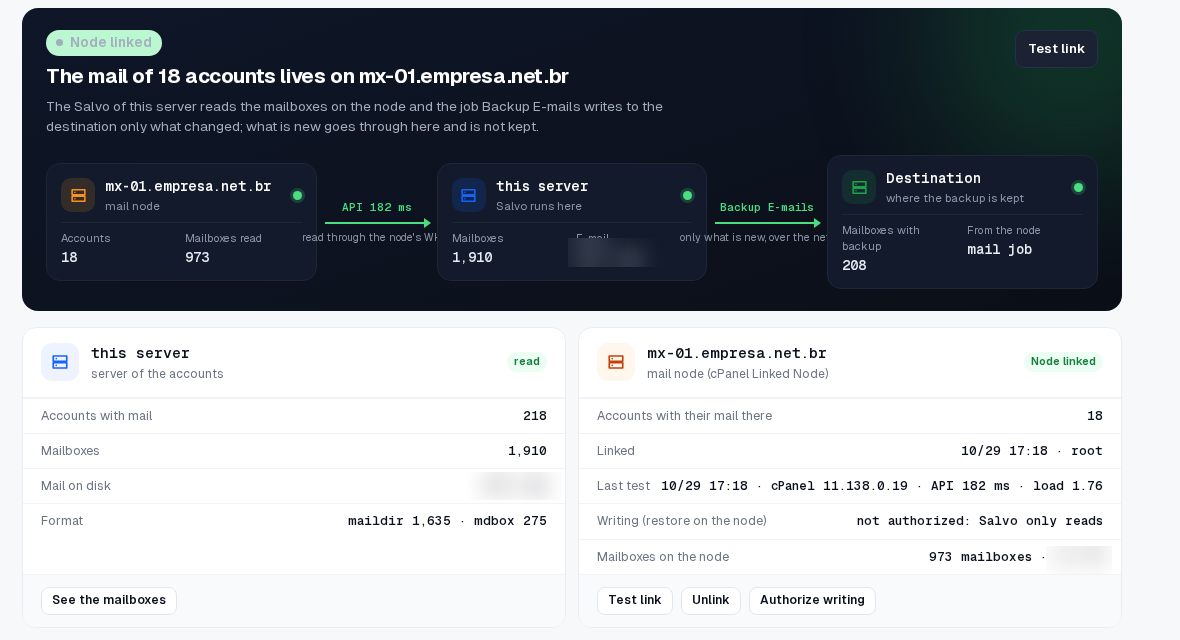
Every use of the access goes to the Audit log. Writing on the node (to restore a mailbox there) is a separate authorization: Authorize writing, revocable at any time with Revoke writing.
An account whose mail lives on a node that is not linked stays out of the mail job, with a warning. Meanwhile, its backup has only the old copy.
The mail job
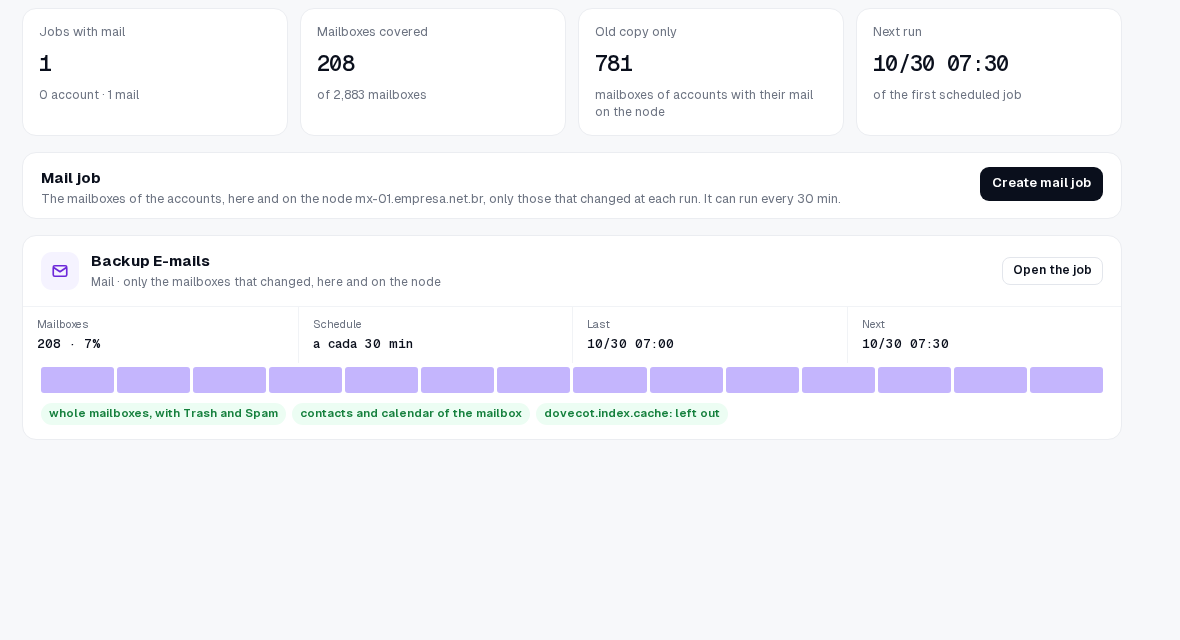
The mail job copies the accounts' mailboxes wherever they are: on this server, straight from the disk (maildir and mdbox), and on a linked node, through the node's WHM. At each run it copies only the mailboxes that changed since their last good copy; a message file already in the backup is not read again. That is why it can run every 30 minutes.
- It takes: the folders and messages (Trash and Spam included), the mailbox's contacts and calendar and its Roundcube
database (identities, preferences, webmail calendar and address book).
dovecot.index.cachestays out. - Create it: Backup jobs › Create job › E-mails (or Create mail job in the center, which comes back to it after creating; the accounts job's Mail only template also opens this kind, 0.5.109). Steps: what goes in (where each account's mail lives), the accounts (all, including those that move to the node later, or a list), the schedule and review. The suggested schedule is every 30 min, kept 2 days plus daily, kept 30 days. See Backup jobs.
- The account job keeps taking the mail with the account, so a whole account comes back on its own. On the same destination, Salvo's engine stores each message once: the mail job adds the 30-minute points without doubling the space.
Mail backup space on the destination
In the Overview, per mail job: the first copy, the total sent, the average per day (of the days with runs after the first copy) and the projection in 30 and 90 days with the job's retention. Space ≈ first copy + sent per day × days kept. Before 2 days of runs after the first copy, it says no basis yet.
Dovecot already writes each message compressed, so compressing again gains almost nothing. The big gain is the incremental: in the lab, after a first copy of 11.27 GB, the next runs read 3.6 MB and 1.7 MB.
On the command line
# read every mailbox now (read only) and the overview
salvo mail-read
salvo mail-overview [--json]
# the mailboxes, with a filter; one mailbox
salvo mailboxes [--filter quota|drop|grew|old_copy|no_backup] [--server local|NODE] [--q TEXT] [--sort size|quota|new|deleted]
salvo mailbox-show --address box@domain.com [--json]

# the mail nodes the WHM knows; link, test, unlink
salvo mail-servers [--json]
salvo mail-server-link --node NODE
salvo mail-server-test --node NODE [--full]
salvo mail-server-unlink --node NODE
# authorize or revoke writing on the node (restoring mailboxes there)
salvo mail-server-write-authorize --node NODE
salvo mail-server-write-revoke --node NODE

# the mail job: every account, or only some (repeat --account); it is created WITHOUT a schedule
salvo job-create --name "E-mails" --destination ID --mail [--account account01]
# the schedule the screen suggests (every 30 min, kept 2 days; daily, kept 30 days)
salvo job-schedule --job N --from-json mail-schedule.json
{
  "time": "03:30",
  "keep_manual": 0,
  "schedules": [
    { "type": "hourly", "every": 1, "every_min": 30, "days": [1, 2, 3, 4, 5, 6, 7], "keep_days": 2 },
    { "type": "daily", "days": [1, 2, 3, 4, 5, 6, 7], "keep_days": 30 }
  ],
  "rules": {}
}
Unlike the screen, job-create --mail creates no schedule: without job-schedule, the job only runs with
salvo run --job N. The server's schedules must be on too (salvo schedules-enable, see Schedules).
NODE is the node's alias as mail-servers shows it.
Next: Restore and download.