Database servers
In cPanel, an account's MySQL databases do not always live on the server itself. The WHM can use a remote MySQL server (in WHM › Manage MySQL Profiles, the active profile says where new databases are created). That other server is the node. When the active profile changes, new databases go to the node and the old ones stay where they were: the server now has databases in both places. And the per-account backup (JetBackup's and the accounts job) only copies what it knows.
This screen answers three questions: which MySQL servers the panel uses, where each database is and who backs each one up. It only reads: Salvo never creates, moves or deletes a database from here.
● available in 0.5.43 ● orphan databases: 0.5.46 ● node limits and activity: 0.5.61 and 0.5.66 ● shortcuts to a prefilled job: 0.5.108 cPanel. On DirectAdmin and without a panel, the screen shows only this server: all databases are on it.
On the screen
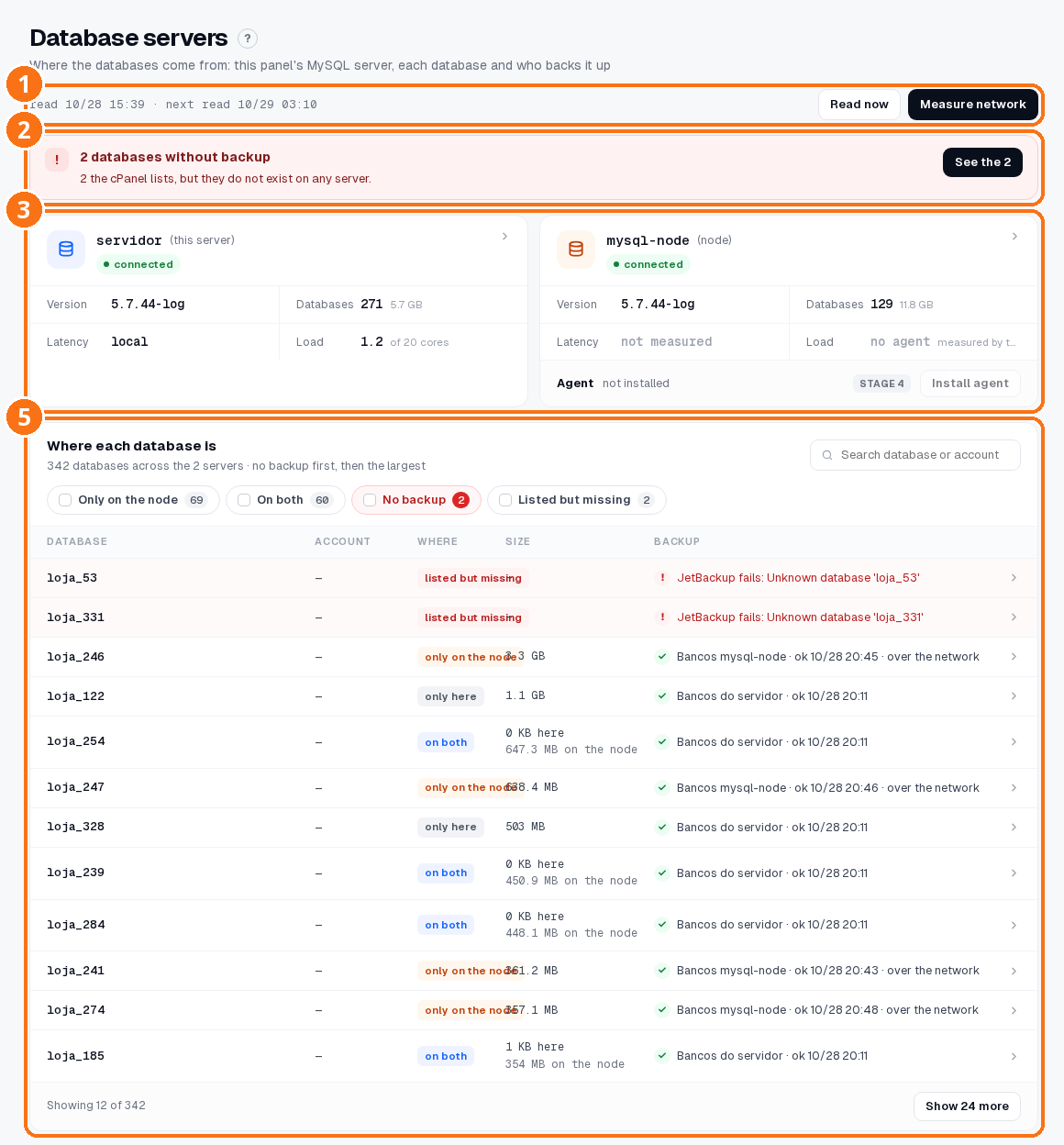
BACKUP › Database servers (right below Destinations). From top to bottom:
- The last read, with Read now and Measure network. Salvo reads the WHM profiles, the databases of each server and their tables every day at 03:10, only when there is a remote profile, with the profile's own credentials and read only. Measure network opens 20 connections to the node and shows the median.
- The warning banner, when there is something to do: the active profile changed (new databases go to the other server), the daily read did not run, or there are databases with no backup, with the reason for each group and View to filter the list.
- One card per server: this server and each node, with the MySQL version, how many databases and how much they take, the latency and the load. Clicking opens the server's drawer.
- Orphan databases (only when there are some): databases that are in MySQL but that cPanel does not link to any account. See Orphan databases.
- Where each database is: the list, with no backup first and then the largest, the search by database or account and the filters Only on the node, On both, No backup, Not read, Listed but missing and Orphans (the last two show when there is one). Clicking a database opens its drawer. When the filtered list has databases without owner, Create a job for the N without owner opens the databases job assistant with them already checked (0.5.108).
On the Dashboard, the Databases on another server card shows when there are databases on the node, and the menu shows a badge with how many have no backup.

When a server does not answer, its databases show as not read, never as no backup. Salvo only states what it could read.
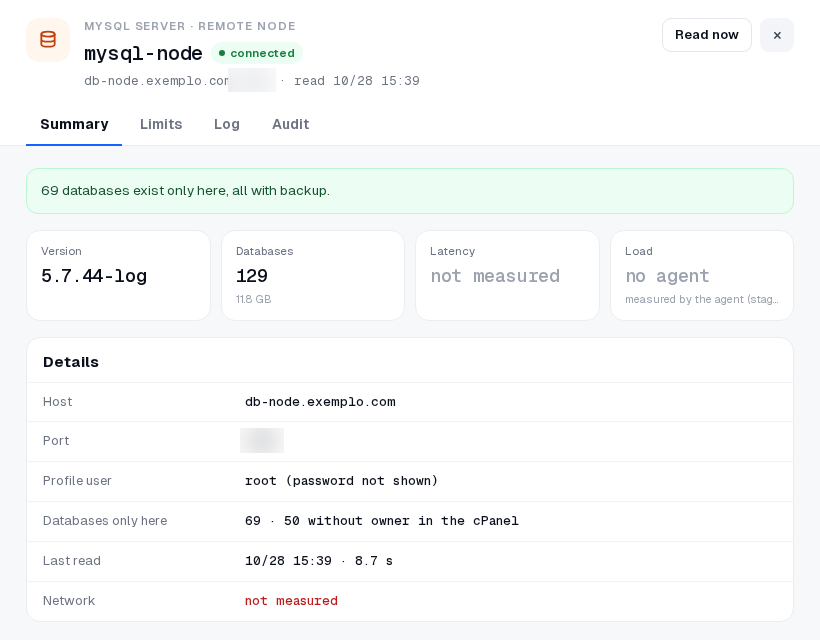
The server's drawer
Four tabs:
| Tab | What it shows |
|---|---|
| Summary | the verdict (how many databases exist only there and how many have no backup, with the reason), version, databases, latency and load; in Details, host, port, profile user (the password never shows), WHM profile (active or inactive), databases only there, the last read and the network |
| Limits | how much Salvo asks of this server when copying its databases: see Node limits |
| Log | this server's reads and measurements in the last 30 days |
| Audit | who did what on this server |
The database's drawer
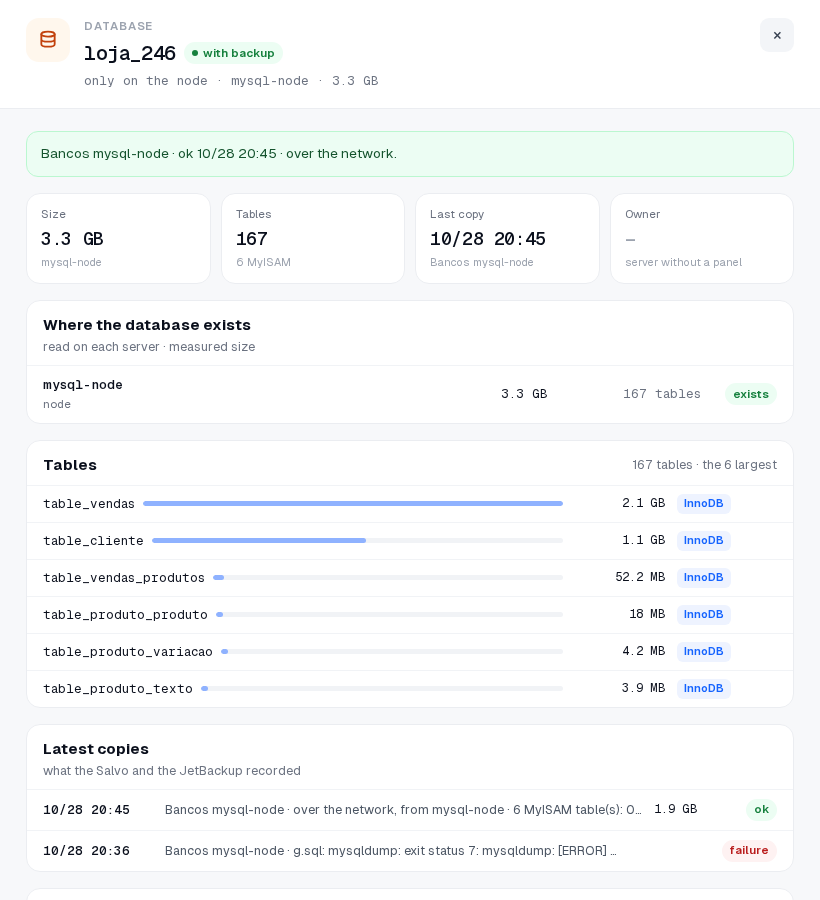
Shows Where the database exists (read on each server, with the measured size), the owner (the panel account, or the panel does not list it), the 6 largest tables and the Latest copies, from Salvo and from JetBackup, with the error when the copy failed. Below, the way to cover the database:
- Add to the accounts job (when it has an owner): opens the owner account in Accounts, with Put in a job; the accounts job copies the account's databases from where they are, the node included.
- Create a job for this database (no owner): opens the databases job assistant with the database already checked and, when it is only on the node, with the node already in From which MySQL server (0.5.108; before, it opened an empty assistant, on the Accounts kind).
Restore on server (0.5.69) opens the backups of the owner account (by the database name's prefix), where the form has Which MySQL server: see Restore a database.
Orphan databases
An orphan database exists in MySQL, but cPanel does not link it to any account: the per-account backup does not copy it, neither JetBackup's nor Salvo's accounts job. For each account whose MySQL users have access to those databases, the screen shows cPanel's own command that makes the link, with Copy the command:
/usr/local/cpanel/bin/dbmaptool account01 --type mysql --dbs 'account01_shop,account01_blog'
Salvo never runs this command: check the list and, if it is right, run it in the terminal and use Read now. When no account has exclusive access, choose the account in WHM › Database Map Tool. An orphan database that exists only on the node stays out of JetBackup even after it is linked (JetBackup copies from the active profile's server): for that one, use a Salvo databases job (below).
Backing up the node's databases
Salvo copies the node's databases over the network, without installing anything on it. Two ways:
- Accounts job: each account's databases are copied from where they are, the node included.
- Databases job, one per MySQL server: in Create job › Databases › Which databases, choose From which MySQL server (this server or the node). All means all databases of that server. This is the way for databases no account owns; this screen's shortcuts (Create a job for this database, Create a job for the N without owner) open the assistant right there, with the databases checked. See Backup jobs.
Node limits
In the server's drawer › Limits (applies from the next run):
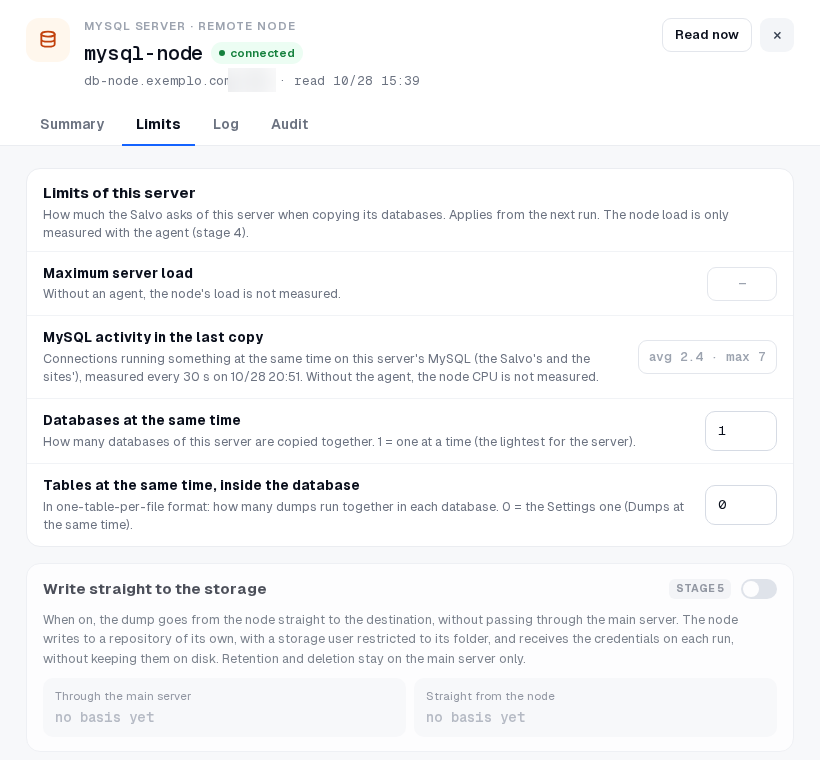
- MySQL activity in the last copy: the connections running something at the same time on the node's MySQL (Salvo's and the sites'), measured every 30 s during the copy, with the average and the maximum. Before the first copy, no basis yet.
- Databases at the same time: how many of the node's databases are copied together, from 1 to 4. The default is 1, the lightest for the server.
- Tables at the same time, inside the database: in the one-table-per-file format, how many dumps run together in each database, up to 16. 0 follows Dumps at the same time in Settings.
For this server, the databases follow the job's parallel setting and the maximum load in Settings. The node's load is not measured: that depends on the agent, which does not exist yet.
On the command line
# read every MySQL server now (WHM profiles, databases, tables, owners and JetBackup results)
salvo mysql-servers-read
# the servers: version, databases, size, last read, network
salvo mysql-servers [--json]
# measure the network to the node (20 connections, the median)
salvo mysql-servers-measure --server PROFILE

# where each database is, no backup first; --only filters (node, both, no_backup, not_read, missing, orphan)
salvo mysql-databases --only node,no_backup [--q TEXT] [--limit N] [--json]
# the orphan databases, with each account's dbmaptool command
salvo mysql-databases --only orphan
# one database: where it exists, largest tables, latest copies
salvo mysql-database-show --name DB [--json]

# the node's limits: show, or change (databases 1–4; tables 0–16, 0 = the banco_paralelo setting)
salvo mysql-servers-limits --server PROFILE
salvo mysql-servers-limits --server PROFILE --databases 2 --tables 4
PROFILE is the profile name in the WHM, as mysql-servers shows it. In the log of each run that copies databases from
the node, the remote MySQL activity and remote MySQL activity summary lines carry the measured activity.
Next: First backup.